
Mastering Photoshop Custom Filters: From Basics to Advanced Applications
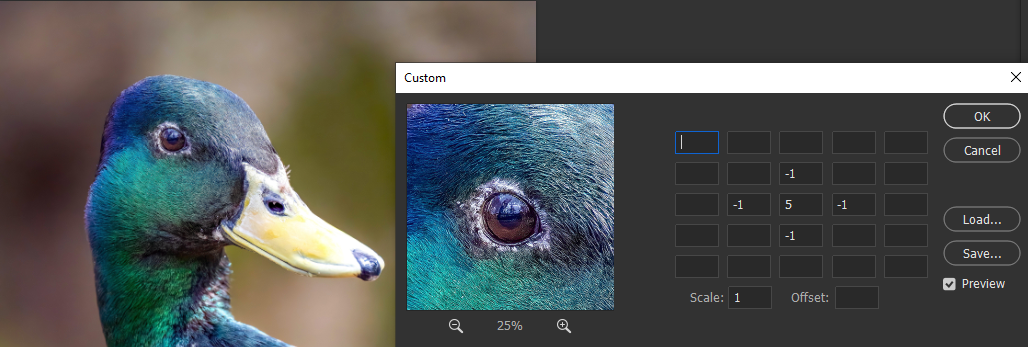
Custom filters in Adobe Photoshop offer a powerful way to directly manipulate pixel values using small matrices, also called kernels. While these concepts are rooted in image processing theory, Photoshop simplifies this by offering a user-friendly interface for defining and experimenting with custom filters—often a 3×3 or 5×5 matrix, combined with scale and offset parameters.
Let’s dive deeper into how they work, what they’re capable of, and how professionals and creatives can unlock their full potential.
🧩 What Is a Custom Filter in Photoshop?
Photoshop’s Custom Filter effect (found under Filter > Other > Custom...) allows users to define:
- A 3×3 or 5×5 kernel (matrix of numbers).
- A Scale value (divisor).
- An Offset value (added after convolution).
These inputs define how each pixel’s value is recalculated based on itself and its neighbors.
📌 Equation Behind the Scenes
When applying a custom filter, Photoshop performs a convolution operation: New Pixel Value=(∑i,j(Ii,j⋅Ki,j))/Scale+Offset\text{New Pixel Value} = \left( \sum_{i,j} (I_{i,j} \cdot K_{i,j}) \right) / \text{Scale} + \text{Offset}New Pixel Value=(i,j∑(Ii,j⋅Ki,j))/Scale+Offset
Where:
- Ii,jI_{i,j}Ii,j = pixel intensity at neighbor (i,j)
- Ki,jK_{i,j}Ki,j = kernel value
- Scale = divisor to normalize brightness
- Offset = shifts final value to prevent clipping or darkening
🧪 Real-World Usage Scenarios
1. 🔎 Edge Detection
- Use case: Finding contours, enhancing outlines before masking.
- Example kernel: diffCopyEdit
-1 -1 -1 -1 8 -1 -1 -1 -1 Scale: 1 | Offset: 0 - Result: Black and white sketch-like outline of image details.
2. 🧼 Smoothing and Noise Reduction
- Use case: Reducing harsh textures or camera noise.
- Example kernel (Gaussian blur-like): yamlCopyEdit
1 2 1 2 4 2 1 2 1 Scale: 16 | Offset: 0 - Result: Softened image without sharp loss of detail.
3. 💥 Sharpening
- Use case: Restoring edge clarity and fine detail.
- Example kernel: yamlCopyEdit
0 -1 0 -1 5 -1 0 -1 0 Scale: 1 | Offset: 0 - Tweaked versions can boost clarity dramatically when applied subtly.
4. 🧱 Emboss and Relief Effects
- Use case: Creating faux-3D or engraved surfaces.
- Example kernel: diffCopyEdit
-2 -1 0 -1 1 1 0 1 2 Scale: 1 | Offset: 128 - Offset = 128 balances zero-sum matrices back into mid-gray tones.
5. 🧬 Experimental Effects
- Combining multiple filters or stacking layers with blend modes lets you invent unique stylized effects:
- Motion blur directions
- High-pass contrast accentuation
- Texture overlays with embossed maps
⚙️ Advanced Concepts
🔄 1. Zero-Sum Filters and the Offset
- If kernel sum = 0 → scale = 1 and offset = 128.
- Why? A zero-sum matrix tends to output 0 (black), so 128 re-centers output to neutral gray.
- Emboss and edge filters often fall in this category.
⚠️ 2. Preventing Clipping
- Photoshop clamps output pixels to [0, 255].
- If kernel + scale + offset result in values outside this range, you’ll lose data.
- Use scale to normalize, offset to recover midtones.
- Eg: Kernel sum = 20 → Scale = 20
- Negative kernel → Offset = 255 (invert)
🧰 3. Stacking Filters
Photoshop doesn’t support filter chaining natively in the Custom dialog, but here’s how to simulate it:
- Duplicate the image layer.
- Apply one custom filter.
- Change the blend mode (e.g., Overlay, Soft Light, Difference).
- Apply a second custom filter on a new duplicate.
- Optionally convert to Smart Object to preserve original.
This lets you simulate more complex multi-stage effects.
🧩 4. Understanding Filter Directionality
- Certain filters emphasize directional edges:
- Emboss at different angles: diffCopyEdit
-1 0 1 -1 0 1 -1 0 1 → Vertical Emboss - Rotating the kernel or transposing values lets you simulate effects like relief from different light directions.
- Emboss at different angles: diffCopyEdit
🧬 5. Designing Custom Filters Intelligently
- Start from known filters and adjust values incrementally.
- Design principles:
- Sums > 1 brighten, < 1 darken.
- Use symmetry for organic results, asymmetry for motion/stylized looks.
- Keep a library of:
- Blur types (box, Gaussian, median)
- Edge detectors (Sobel, Prewitt, Laplacian)
- Sharpeners (standard, unsharp mask-like)
- Artistic (emboss, motion, ripple)
🧑🎨 Creative Applications for Designers
| Task | Custom Filter Use |
|---|---|
| Print prepress | Sharpen subtle textures without halos |
| Game textures | Generate normal-like embossed maps from photos |
| Concept art | Outline styles from real-world sketches |
| Product photos | Combine blur + sharpening to simulate depth of field |
| Pattern generation | Use edge detection + emboss + difference blending |
🛠 Custom Filter Design Tool (Tip)
There is no real-time visual feedback in Photoshop’s native Custom filter panel. But here’s a workaround:
- Use online tools like:
- Apply filter logic in a photo editor or code (e.g., OpenCV, Python, GIMP).
- Once verified, replicate in Photoshop.
1. Custom Filters in Photoshop & Applications 📐
Photoshop supports defining up to 5×5 discrete integer-weight filters, with accompanying scale and offset.
- Core process: each pixel is multiplied by neighboring weights, summed, then scaled and offset—maintaining feedback-free calculations using original pixel values.
- Design guidelines:
- Scale typically equals the sum of weights.
- Sum ≈ 1 → no offset; sum = 0 → offset = 128; sum = -1 → offset = 255.
- Avoid sum/scale exceeding ±1 to prevent over/under-exposure.
- Examples:
- Gaussian blur: soft blur using symmetric positive weights.
- Sharpen: center 5, immediate neighbors -1 → enhances edges.
- Emboss: directional edge emboss; zero-sum requires mid-tone offset (128).
- Invert: negative center weight with offset (255).
These filters are intuitive extensions of convolutional kernels, enabling artists to craft custom effects.
2. Image Kernels & Convolution Essentials
- Kernel definition: a small matrix KKK (e.g., 3×3) that lies over an image patch. Apply: multiply pixel values by kernel, sum, and assign to output pixel.
- Common 3×3 kernels include:
- Identity (1 at center): leaves image unchanged.
- Gaussian blur: weights center heavier, smooths noise.
- Emboss: gives textured “bas‐relief” effect directionally.
- Outline (Laplacian): sharply accentuates changes by sum weights = 0.
- Sharpen: center positive, neighbors negative.
- Sobel filters: detect edges along x or y axes.
These kernels can be extended (5×5, 7×7 etc.) but small odd dimensions are practical. Uncommon filters (Gaussian, Sobel) benefit from being separable: e.g., a 5×5 Gaussian = 1×5 * 5×1, improving efficiency .
Handling boundaries:
- Common padding strategies: ignore, zero pad, replicate, or reflect border pixels .
3. Advanced Concepts & CNN Interplay
- Kernel size rationale: Square odd-size ensures a center element, symmetric processing, and layering of simpler kernels (e.g., two 3×3 operations ≈ one 5×5) .
- Separable filters reduce computing cost: O(m+n) instead of O(m·n).
- CNN kernels go beyond fixed filters—they are learned during training. Each convolutional filter picks up features like edges or textures, creating feature maps. Multiple learned kernels across layers extract progressively complex patterns from raw data
- Dilated kernels, transposed convolutions, depthwise separable, and deformable convolutions are advanced variations that enhance receptive field, efficiency, or adaptability in tasks like segmentation, generation, or detection
Feel free to download Photoshop Custom Filter examples I have created from the link below: