
Creating a Trefoil Knot Tube Generator in Cinema 4D with Python
Are you looking to expand your procedural modeling toolkit in Cinema 4D? This blog post will walk you through a powerful Python generator script that creates a beautiful trefoil knot tube, perfect for abstract animation, mathematical art, or unique 3D assets. Whether you’re a C4D artist, a technical director, or a coding enthusiast, this script will help you bring advanced parametric geometry into your workflow.
What Does This Script Do?
This Cinema 4D Python script procedurally generates a trefoil knot in the form of a smooth, tubular mesh. Using classic parametric equations, the knot is traced in 3D space and a circular cross-section is swept along the curve to create a seamless tube.
- Geometry: Trefoil knot (a classic mathematical knot with a single loop and three crossings)
- Mesh: Smooth, closed tube with customizable radius and resolution
- Technique: Procedural generation using Python and C4D’s API
How the Script Works
Let’s break down the main steps of the script:
1. Define the Trefoil Knot
The script uses the following parametric equations for the trefoil knot centerline:
x = sin(u) + 2 * sin(2u)
y = cos(u) - 2 * cos(2u)
z = -sin(3u)
Where u ranges from 0 to 2π.
2. Calculate Cross-Section Rings
For each segment along the knot’s curve, a circle (the tube’s cross-section) is oriented using the tangent, normal, and binormal vectors.
3. Build the Mesh
Vertices are connected to form polygons—each ring is connected to the next, creating a continuous, closed mesh. The script handles all the math for you, ensuring smooth, non-intersecting geometry.
4. Easy Customization
You can change:
- Number of curve segments (smoothness of the knot)
- Number of circle segments (smoothness of the tube)
- Tube radius (thickness)
import c4d, math

def normalize(v):
    mag = v.GetLength()
    return v / mag if mag != 0 else v

def main() -> c4d.PolygonObject:
    """
    Trefoil Knot Tube Generator for Cinema 4D 2025

    This Python generator creates a trefoil knot in the form of a tubular mesh.
    The tube is generated by sweeping a circle along the trefoil knot centerline.

    Parametric equations for the trefoil knot centerline:
      u in [0, 2π)
      x = sin(u) + 2 sin(2u)
      y = cos(u) - 2 cos(2u)
      z = - sin(3u)

    The tube is created by generating a circular cross-section at points along the centerline.
    """
    # Hard-coded parameters.
    num_curve_segments = 80    # Number of segments along the trefoil knot curve.
    circle_segments = 16       # Number of segments in the tube's circular cross-section.
    tube_radius = 1.0         # Radius of the tube.

    # Calculate total vertices: one circle (ring) per curve segment.
    total_rings = num_curve_segments
    vertex_count = total_rings * circle_segments
    poly_count = total_rings * circle_segments * 2  # initially as quads (split into two triangles)

    # Create the polygon object.
    mesh = c4d.PolygonObject(vertex_count, poly_count)
    mesh.SetName("Trefoil Knot Tube")

    # Compute centerline points and tangents.
    centers = []
    tangents = []
    for i in range(num_curve_segments):
        u = (2 * math.pi * i) / num_curve_segments
        # Trefoil knot parametric equations.
        x = math.sin(u) + 2 * math.sin(2 * u)
        y = math.cos(u) - 2 * math.cos(2 * u)
        z = -math.sin(3 * u)
        centers.append(c4d.Vector(x, y, z))

    # Compute tangents using forward differences.
    for i in range(num_curve_segments):
        next_index = (i + 1) % num_curve_segments
        tangent = centers[next_index] - centers[i]
        tangents.append(normalize(tangent))

    # Generate vertices for each ring.
    vertices = []
    for i in range(total_rings):
        center = centers[i]
        tangent = tangents[i]

        # Choose an arbitrary reference vector (avoid colinearity with tangent).
        ref = c4d.Vector(0, 0, 1)
        if abs(tangent.Dot(ref)) > 0.99:
            ref = c4d.Vector(0, 1, 0)
        normal = tangent.Cross(ref)
        normal = normalize(normal)
        binormal = tangent.Cross(normal)
        binormal = normalize(binormal)

        for j in range(circle_segments):
            theta = 2 * math.pi * j / circle_segments
            offset = (math.cos(theta) * normal + math.sin(theta) * binormal) * tube_radius
            vertex = center + offset
            vertices.append(vertex)
    mesh.SetAllPoints(vertices)

    # Create polygons connecting adjacent rings.
    poly_index = 0
    for i in range(total_rings):
        next_ring = (i + 1) % total_rings
        for j in range(circle_segments):
            next_j = (j + 1) % circle_segments
            v0 = i * circle_segments + j
            v1 = next_ring * circle_segments + j
            v2 = next_ring * circle_segments + next_j
            v3 = i * circle_segments + next_j
            # First triangle.
            mesh.SetPolygon(poly_index, c4d.CPolygon(v0, v1, v2))
            poly_index += 1
            # Second triangle.
            mesh.SetPolygon(poly_index, c4d.CPolygon(v0, v2, v3))
            poly_index += 1

    mesh.Message(c4d.MSG_UPDATE)
    return mesh

if __name__=='__main__':
    main()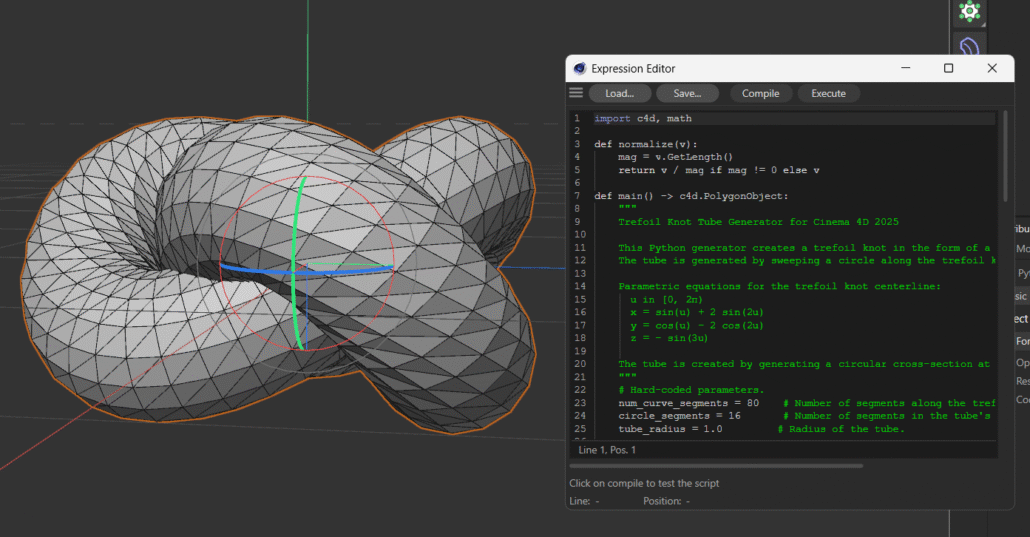
Final Thoughts
Procedural modeling in Cinema 4D unlocks creative possibilities that are difficult to achieve with manual modeling. With this Python generator script, you can easily add stunning mathematical shapes like the trefoil knot to your scenes, animations, or motion graphics projects. Experiment with the parameters to create variations, or expand the script for even more complex forms!
Download “Trefoil Knot with Python Generator in Cinema 4D” Trefoil-Knot.zip – Downloaded 0 times – 113.33 KB


