Motion designers often face the challenge of adjusting animation timing across multiple objects. Whether you’re extending a sequence to fit new music or compressing keyframes for snappier motion, doing this manually can be tedious. This Python script for Cinema 4D introduces a custom dialog that makes scaling and extending keyframe timing far more intuitive.
What the Script Does
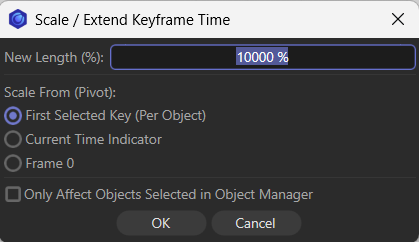
The script creates a dialog window called “Scale / Extend Keyframe Time”. From here, you can:
- Set a new length percentage: Enter a scaling factor (e.g., 200% to double the animation length, or 50% to halve it).
- Choose a pivot mode: Decide whether scaling should be anchored to the first selected key, the current time indicator, or frame 0.
- Restrict to selected objects: Apply changes only to objects highlighted in the Object Manager, or let the script scan the entire scene for selected keys.
- Confirm or cancel changes: With undo support, you can safely experiment without fear of losing your original animation.
Why It’s Useful
Instead of dragging keyframes one by one, this tool applies a mathematical formula:
New Time=Pivot+(Old Time−Pivot)×Scale Factor\text{New Time} = \text{Pivot} + (\text{Old Time} – \text{Pivot}) \times \text{Scale Factor}
This ensures consistent scaling across all selected keys, preserving relative timing while adapting the overall duration. For motion designers, this means:
- Faster workflow: Adjust entire sequences in seconds.
- Precision control: Anchor scaling to meaningful points like the first keyframe or the playhead.
- Non-destructive editing: Built-in undo support keeps experimentation safe.
- Flexible scope: Apply changes globally or limit them to selected objects.
How It Works Behind the Scenes
- The script scans each object’s animation tracks for selected keyframes.
- It calculates the earliest selected key if the pivot mode is set to “First Key.”
- It applies the scaling formula to each keyframe’s time value.
- Finally, it updates the scene and triggers Cinema 4D’s event system to refresh the timeline.
This modular approach makes the script easy to extend. For example, you could add options for easing, batch processing, or even integrating with custom effectors.
import c4d
from c4d import gui

# --- ID Constants for the Dialog ---
DLG_GRP_MAIN = 1000
DLG_LBL_SCALE = 1001
DLG_VAL_SCALE = 1002
DLG_GRP_MODE = 1003
DLG_RAD_FIRST = 1004
DLG_RAD_CURR = 1005
DLG_RAD_ZERO = 1006
DLG_CHK_SEL = 1007
DLG_BTN_OK = 1008
DLG_BTN_CANCEL = 1009

class TimeScaleDlg(gui.GeDialog):
    def __init__(self):
        self.scale_percent = 100.0
        self.pivot_mode = DLG_RAD_FIRST # Default to First Key
        self.restrict_selection = False
        self.ok_pressed = False

    def CreateLayout(self):
        self.SetTitle("Scale / Extend Keyframe Time")

        # Scale Input
        self.GroupBegin(DLG_GRP_MAIN, c4d.BFH_SCALEFIT, 2, 0)
        self.AddStaticText(DLG_LBL_SCALE, c4d.BFH_LEFT, name="New Length (%):")
        self.AddEditNumberArrows(DLG_VAL_SCALE, c4d.BFH_SCALEFIT)
        self.GroupEnd()

        # Pivot Mode (Radio Buttons)
        self.AddSeparatorH(c4d.BFH_SCALEFIT)
        self.AddStaticText(0, c4d.BFH_LEFT, name="Scale From (Pivot):")

        self.GroupBegin(DLG_GRP_MODE, c4d.BFH_SCALEFIT, 1, 0)
        self.AddRadioButton(DLG_RAD_FIRST, c4d.BFH_LEFT, name="First Selected Key (Per Object)")
        self.AddRadioButton(DLG_RAD_CURR, c4d.BFH_LEFT, name="Current Time Indicator")
        self.AddRadioButton(DLG_RAD_ZERO, c4d.BFH_LEFT, name="Frame 0")
        self.GroupEnd()

        self.AddSeparatorH(c4d.BFH_SCALEFIT)

        # Restriction Checkbox
        self.GroupBegin(0, c4d.BFH_SCALEFIT, 1, 0)
        self.AddCheckbox(DLG_CHK_SEL, c4d.BFH_LEFT, 0, 0, name="Only Affect Objects Selected in Object Manager")
        self.GroupEnd()

        # Buttons
        self.GroupBegin(0, c4d.BFH_CENTER, 2, 0)
        self.AddButton(DLG_BTN_OK, c4d.BFH_SCALE, name="OK")
        self.AddButton(DLG_BTN_CANCEL, c4d.BFH_SCALE, name="Cancel")
        self.GroupEnd()

        return True

    def InitValues(self):
        self.SetFloat(DLG_VAL_SCALE, self.scale_percent, format=c4d.FORMAT_PERCENT)
        self.SetInt32(DLG_RAD_FIRST, 1) # Set Radio Button Group value
        self.SetBool(DLG_CHK_SEL, self.restrict_selection)
        return True

    def Command(self, id, msg):
        if id == DLG_BTN_OK:
            self.scale_percent = self.GetFloat(DLG_VAL_SCALE)

            # Determine Radio Selection
            if self.GetBool(DLG_RAD_FIRST): self.pivot_mode = DLG_RAD_FIRST
            elif self.GetBool(DLG_RAD_CURR): self.pivot_mode = DLG_RAD_CURR
            elif self.GetBool(DLG_RAD_ZERO): self.pivot_mode = DLG_RAD_ZERO

            self.restrict_selection = self.GetBool(DLG_CHK_SEL)
            self.ok_pressed = True
            self.Close()
        elif id == DLG_BTN_CANCEL:
            self.Close()
        return True

# --- Helpers ---
def GetNextObject(op):
    if not op: return None
    if op.GetDown(): return op.GetDown()
    while not op.GetNext() and op.GetUp():
        op = op.GetUp()
    return op.GetNext()

def HasSelectedKeys(op):
    tracks = op.GetCTracks()
    if not tracks: return False
    for track in tracks:
        curve = track.GetCurve()
        if not curve: continue
        cnt = curve.GetKeyCount()
        for i in range(cnt):
            key = curve.GetKey(i)
            if (key.GetNBit(c4d.NBIT_TL1_SELECT) or
                key.GetNBit(c4d.NBIT_TL2_SELECT) or
                key.GetNBit(c4d.NBIT_TL3_SELECT) or
                key.GetNBit(c4d.NBIT_TL4_SELECT)):
                return True
    return False

# --- Main Logic ---
def main():
    # 1. Dialog
    dlg = TimeScaleDlg()
    dlg.Open(c4d.DLG_TYPE_MODAL, defaultw=350, defaulth=200)
    if not dlg.ok_pressed: return

    scale_factor = dlg.scale_percent  # e.g., 2.0 or 0.5
    pivot_mode = dlg.pivot_mode
    restrict_to_om = dlg.restrict_selection

    current_time_seconds = doc.GetTime().Get() # For Current Time Pivot

    # 2. Find Objects
    objects_to_process = []
    if restrict_to_om:
        objects_to_process = doc.GetActiveObjects(c4d.GETACTIVEOBJECTFLAGS_CHILDREN)
    else:
        op = doc.GetFirstObject()
        while op:
            if HasSelectedKeys(op):
                objects_to_process.append(op)
            op = GetNextObject(op)

    if not objects_to_process:
        gui.MessageDialog("No objects with selected keys found.")
        return

    doc.StartUndo()
    updates_made = False

    for obj in objects_to_process:

        # --- Step A: Collect all selected keys for this object ---
        # We need them in a list first to find the "Earliest Time" (Pivot) if needed
        selected_keys_data = [] # Stores (key_object, original_time)

        min_time_val = float('inf')

        tracks = obj.GetCTracks()
        for track in tracks:
            curve = track.GetCurve()
            if not curve: continue

            cnt = curve.GetKeyCount()
            for i in range(cnt):
                key = curve.GetKey(i)
                if (key.GetNBit(c4d.NBIT_TL1_SELECT) or
                    key.GetNBit(c4d.NBIT_TL2_SELECT) or
                    key.GetNBit(c4d.NBIT_TL3_SELECT) or
                    key.GetNBit(c4d.NBIT_TL4_SELECT)):

                    t_val = key.GetTime().Get()
                    selected_keys_data.append( (key, t_val, curve) )

                    if t_val < min_time_val:
                        min_time_val = t_val

        if not selected_keys_data:
            continue

        # --- Step B: Determine Pivot for this object ---
        pivot_time = 0.0

        if pivot_mode == DLG_RAD_FIRST:
            pivot_time = min_time_val # The earliest selected key
        elif pivot_mode == DLG_RAD_CURR:
            pivot_time = current_time_seconds
        elif pivot_mode == DLG_RAD_ZERO:
            pivot_time = 0.0

        # --- Step C: Apply Scaling ---
        doc.AddUndo(c4d.UNDOTYPE_CHANGE, obj)

        for key, original_time, curve in selected_keys_data:
            # Formula: New = Pivot + (Old - Pivot) * Scale

            diff = original_time - pivot_time
            new_time_val = pivot_time + (diff * scale_factor)

            key.SetTime(curve, c4d.BaseTime(new_time_val))
            updates_made = True

    doc.EndUndo()

    if updates_made:
        c4d.EventAdd()

if __name__ == '__main__':
    main()