
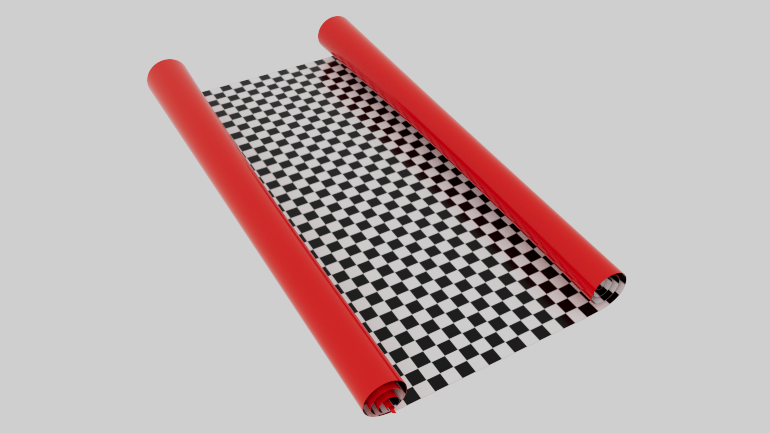
Rolled paper, spirals, and scroll-like geometry are common motifs in motion design. Whether you’re animating a poster unfurling, a scroll opening, or a stylized ribbon, having a procedural generator gives you flexibility to adjust parameters without rebuilding geometry from scratch. This script provides:
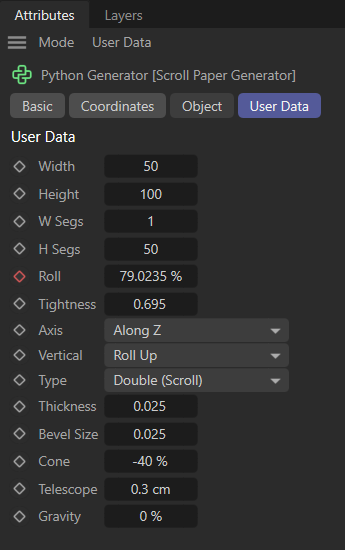
- User data controls for width, length, segment counts, roll percentage, gap, axis, vertical direction, roll type, thickness, bevel size, cone taper, telescope offset, and gravity sag.
- Subdivision logic that ensures clean bevels and safety loops for smooth deformations.
- Spiral math that calculates realistic roll curvature based on paper length and gap spacing.
- Surface grid generation that builds a deformable plane before extruding thickness.
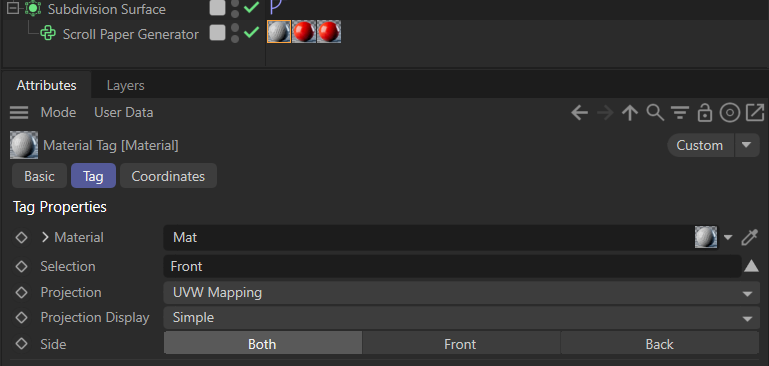
- Polygon and UV creation with selection tags for front, back, and edge surfaces.
Key Features Explained
- Subdivision Ratios: The script dynamically calculates bevel and safety loop ratios to ensure crisp edges without geometry collapse.
- Spiral Calculation: Using square-root-based math, the generator computes the spiral vector for rolled sections, aligning the geometry with realistic paper physics.
- Cone Scaling: A taper parameter (
cone_val) allows one side of the roll to shrink, simulating cone-shaped paper rolls. - Gravity Sag: Flat sections sag naturally based on a gravity multiplier, adding realism to unfurled paper.
- Telescoping: Rolled sections can shift width dynamically, simulating telescopic offset.
- Polygon Construction: The generator builds polygons for front, back, edges, and caps, complete with UV mapping and selection tags for easy material assignment.
Practical Applications
This generator is perfect for:
- Motion graphics: Animated posters, scrolls, banners, or stylized ribbons.
- Product visualization: Packaging mockups, rolled materials, or fabric simulations.
- Creative experiments: Exploring procedural geometry and learning advanced Cinema 4D Python scripting.
Why This Matters
Instead of relying on deformers or manual modeling, this generator gives you parametric control over rolled paper geometry. It’s a great example of how Cinema 4D Python scripting can bridge technical precision with artistic freedom. By exposing parameters as user data, the script becomes artist-friendly, while still retaining the mathematical rigor needed for complex geometry.
Conclusion
This Cinema 4D Python generator demonstrates how scripting can unlock new creative workflows. With features like bevel subdivision, spiral math, cone scaling, telescoping, and gravity sag, it’s a versatile tool for motion designers who want procedural control over rolled paper geometry. If you’re looking to expand your toolkit, diving into Cinema 4D Python scripting is one of the most rewarding paths you can take.
import c4d
import math

def main():
    # -----------------------------------------------------------------------
    # 1. READ USER DATA
    # -----------------------------------------------------------------------
    try:
        width       = op[c4d.ID_USERDATA, 1]
        total_len   = op[c4d.ID_USERDATA, 2]
        seg_w       = op[c4d.ID_USERDATA, 3]
        seg_h       = op[c4d.ID_USERDATA, 4]
        roll_pct    = op[c4d.ID_USERDATA, 5]
        gap         = op[c4d.ID_USERDATA, 6]
        axis        = op[c4d.ID_USERDATA, 7]  # 0=X, 1=Z
        vert_dir    = op[c4d.ID_USERDATA, 8]  # 0=Up, 1=Down
        roll_type   = op[c4d.ID_USERDATA, 9]  # 0=Single, 1=Double
        thickness   = op[c4d.ID_USERDATA, 10]
        bevel_sz    = op[c4d.ID_USERDATA, 11]
        cone_val    = op[c4d.ID_USERDATA, 12] # -1.0 to 1.0
        telescope   = op[c4d.ID_USERDATA, 13]
        gravity     = op[c4d.ID_USERDATA, 14]
    except:
        return c4d.BaseObject(c4d.Onull)

    # Clamps & Setup
    if seg_h < 4: seg_h = 4
    if seg_w < 1: seg_w = 1
    if gap < 0.001: gap = 0.001
    if roll_pct < 0.0: roll_pct = 0.0
    if roll_pct > 1.0: roll_pct = 1.0

    half_thick = thickness * 0.5
    y_sign = -1.0 if vert_dir == 0 else 1.0
    b = gap / (2.0 * math.pi)

    # -----------------------------------------------------------------------
    # 2. SUBDIVISION LOGIC (Bevels + Safety Loops)
    # -----------------------------------------------------------------------
    def get_subdivision_ratios(segments, total_size, bevel):
        max_bevel = total_size / 4.1
        if bevel > max_bevel: bevel = max_bevel
        if total_size <= 0.001: return [0.0, 1.0]

        bevel_ratio = bevel / total_size
        safety_ratio = bevel_ratio * 2.0

        ratios = []
        ratios.append(0.0)
        ratios.append(bevel_ratio)
        ratios.append(safety_ratio)

        inner_start = safety_ratio
        inner_end   = 1.0 - safety_ratio
        inner_span  = inner_end - inner_start

        if segments > 1:
            for i in range(1, segments):
                pct = float(i) / float(segments)
                val = inner_start + (pct * inner_span)
                ratios.append(val)

        ratios.append(1.0 - safety_ratio)
        ratios.append(1.0 - bevel_ratio)
        ratios.append(1.0)
        return ratios

    ratios_h = get_subdivision_ratios(seg_h, total_len, bevel_sz)
    ratios_w = get_subdivision_ratios(seg_w, width, bevel_sz)

    count_h = len(ratios_h)
    count_w = len(ratios_w)

    # -----------------------------------------------------------------------
    # 3. SPIRAL CALCULATION (The Core Math)
    # -----------------------------------------------------------------------
    # This now just returns the raw spiral vector from center,
    # it does NOT handle the offset/anchoring. That happens per slice.
    def get_raw_spiral_vec(dist_to_core, b_scaled, theta_max, y_sign):
        if dist_to_core < 0.01: dist_to_core = 0.01

        # Note: b_scaled is the gap factor AFTER cone scaling
        theta = math.sqrt(2.0 * dist_to_core / b_scaled)
        r = b_scaled * theta

        tangent_at_lip = theta_max + math.atan(theta_max)
        rot_offset = math.pi - tangent_at_lip

        angle = theta + rot_offset
        sx = r * math.cos(angle)
        sy = r * math.sin(angle) * y_sign

        return sx, sy, angle

    # Pre-calculate Roll Physics
    if roll_type == 1: # Double
        rolled_len = total_len * roll_pct
        len_side = rolled_len / 2.0
        limit_left = len_side
        limit_right = total_len - len_side
        # Base Theta Max (before cone scaling)
        base_theta_max = math.sqrt(2.0 * len_side / b) if len_side > 0 else 0
    else: # Single
        len_side = total_len * roll_pct
        limit_left = -1.0
        limit_right = total_len - len_side
        base_theta_max = math.sqrt(2.0 * len_side / b) if len_side > 0 else 0

    # -----------------------------------------------------------------------
    # 4. GENERATE SURFACE GRID (Deformed Plane)
    # -----------------------------------------------------------------------
    # We create a 2D grid of the "Middle Surface" (before thickness)
    # surface_grid[i][j] -> Vector

    surface_grid = []
    center_offset_long = -total_len / 2.0

    for i in range(count_h):
        t_h = ratios_h[i]
        pos_along = t_h * total_len

        row_points = []

        for j in range(count_w):
            t_w = ratios_w[j]

            # 1. CALCULATE CONE SCALE FOR THIS SLICE
            # --------------------------------------
            # cone_val: -1.0 (Left small) to 1.0 (Right small)
            # t_w: 0.0 to 1.0

            scale_mult = 1.0
            if abs(cone_val) > 0.001:
                if cone_val > 0: # Right side gets smaller
                    scale_mult = 1.0 - (t_w * cone_val)
                else: # Left side gets smaller
                    # t_w=0 -> scale=1-abs, t_w=1 -> scale=1
                    scale_mult = 1.0 - ((1.0 - t_w) * abs(cone_val))

            # Clamp to avoid inversion or singularity
            if scale_mult < 0.05: scale_mult = 0.05

            # The Spiral Parameter 'b' scales with the cone
            b_local = b * scale_mult

            # 2. CALCULATE TIP OFFSET (DYNAMIC ANCHOR)
            # --------------------------------------
            # As the spiral shrinks, its geometric center moves closer to the
            # anchor point (Tip). We must calculate this PER SLICE.
            tip_lx, tip_ly = 0, 0
            if len_side > 0:
                # We use the BASE theta_max to ensure rotation alignment,
                # but scaled 'b' for position.
                # Actually, theta_max depends on Length/b.
                # If b shrinks, theta increases for same length?
                # No, for a paper cone, the length is constant.
                # theta = sqrt(2*L/b). If b is smaller, theta is larger (tighter roll).

                # Correct Logic: Re-calculate theta_max for this specific slice's physics
                theta_max_local = math.sqrt(2.0 * len_side / b_local)

                tip_lx, tip_ly, _ = get_raw_spiral_vec(len_side, b_local, theta_max_local, y_sign)

            # 3. DETERMINE POSITION
            # ---------------------
            lx, ly = 0.0, 0.0
            roll_angle = 0.0
            is_rolled = False

            # Double Roll
            if roll_type == 1:
                if pos_along < limit_left: # Left Roll
                    theta_max_local = math.sqrt(2.0 * len_side / b_local) if len_side > 0 else 0

                    raw_x, raw_y, ang = get_raw_spiral_vec(pos_along, b_local, theta_max_local, y_sign)

                    # Anchor Logic: The tip is at limit_left
                    off_x = raw_x - tip_lx
                    off_y = raw_y - tip_ly
                    lx = limit_left - off_x
                    ly = off_y
                    roll_angle = ang
                    is_rolled = True

                elif pos_along > limit_right: # Right Roll
                    theta_max_local = math.sqrt(2.0 * len_side / b_local) if len_side > 0 else 0

                    raw_x, raw_y, ang = get_raw_spiral_vec(total_len - pos_along, b_local, theta_max_local, y_sign)
                    off_x = raw_x - tip_lx
                    off_y = raw_y - tip_ly
                    lx = limit_right + off_x
                    ly = off_y
                    roll_angle = ang
                    is_rolled = True

                else: # Flat Middle
                    lx = pos_along
                    ly = 0.0
                    # Gravity
                    if limit_right > limit_left:
                        mid_span = limit_right - limit_left
                        norm_mid = (pos_along - limit_left) / mid_span
                        sag = 4.0 * norm_mid * (1.0 - norm_mid)
                        g_y = sag * (gravity * -10.0)
                        if vert_dir == 1: g_y *= -1.0
                        ly += g_y

            # Single Roll
            else:
                if pos_along <= limit_right: # Flat Start
                    lx = pos_along
                    ly = 0.0
                    # Gravity
                    if limit_right > 0:
                        norm_dist = 1.0 - (pos_along / limit_right)
                        sag = norm_dist * norm_dist
                        g_y = sag * (gravity * -10.0)
                        if vert_dir == 1: g_y *= -1.0
                        ly += g_y
                else: # Right Roll
                    theta_max_local = math.sqrt(2.0 * len_side / b_local) if len_side > 0 else 0

                    raw_x, raw_y, ang = get_raw_spiral_vec(total_len - pos_along, b_local, theta_max_local, y_sign)
                    off_x = raw_x - tip_lx
                    off_y = raw_y - tip_ly
                    lx = limit_right + off_x
                    ly = off_y
                    roll_angle = ang
                    is_rolled = True

            # 4. TELESCOPE & WIDTH POSITION
            # -----------------------------
            w_start = -width / 2.0
            w_pos = w_start + (t_w * width)

            if is_rolled and abs(telescope) > 0.001:
                # Shift width based on angle
                shift = (roll_angle / (math.pi*2)) * telescope
                # Invert shift for left roll to push outwards correctly?
                # Usually telescope goes one way.
                # If you want it symmetrical for double roll:
                if roll_type == 1 and pos_along < limit_left:
                    shift *= -1.0

                w_pos += shift

            # Store Surface Point
            row_points.append( c4d.Vector(lx + center_offset_long, ly, w_pos) )

        surface_grid.append(row_points)

    # -----------------------------------------------------------------------
    # 5. EXTRUDE THICKNESS FROM SURFACE GRID
    # -----------------------------------------------------------------------
    pts_top = []
    pts_bot = []

    for i in range(count_h):
        for j in range(count_w):
            curr = surface_grid[i][j]

            # Calculate Normal using Neighbors (Length direction)
            # This ensures thickness is perpendicular to the paper path
            if i < count_h - 1:
                nxt = surface_grid[i+1][j]
                dx = nxt.x - curr.x
                dy = nxt.y - curr.y
            else:
                prev = surface_grid[i-1][j]
                dx = curr.x - prev.x
                dy = curr.y - prev.y

            length = math.sqrt(dx*dx + dy*dy)
            if length < 0.00001: length = 1.0
            tx = dx / length
            ty = dy / length

            # Normal (-Y, X)
            nx = -ty
            ny = tx

            # Extrude
            # Top Surface
            t_x = curr.x + (nx * half_thick)
            t_y = curr.y + (ny * half_thick)
            t_z = curr.z # Z is width, normal is mostly 0 in Z unless twisted

            # Bot Surface
            b_x = curr.x - (nx * half_thick)
            b_y = curr.y - (ny * half_thick)
            b_z = curr.z

            # Axis Mapping
            if axis == 0: # Roll along X
                pts_top.append(c4d.Vector(t_x, t_y, t_z))
                pts_bot.append(c4d.Vector(b_x, b_y, b_z))
            else:         # Roll along Z (Swap X/Z)
                pts_top.append(c4d.Vector(t_z, t_y, t_x))
                pts_bot.append(c4d.Vector(b_z, b_y, b_x))

    all_points = pts_top + pts_bot
    total_pts = len(all_points)

    # -----------------------------------------------------------------------
    # 6. BUILD POLYGONS & UVs
    # -----------------------------------------------------------------------
    cells_h = count_h - 1
    cells_w = count_w - 1

    cnt_face = cells_w * cells_h
    cnt_edge_long = cells_h * 2
    cnt_edge_cap  = cells_w * 2
    total_polys = (cnt_face * 2) + cnt_edge_long + cnt_edge_cap

    poly_obj = c4d.PolygonObject(total_pts, total_polys)
    poly_obj.SetAllPoints(all_points)

    uvw_tag = c4d.UVWTag(total_polys)
    sel_front = c4d.BaseSelect()
    sel_back  = c4d.BaseSelect()
    sel_edge  = c4d.BaseSelect()

    pid = 0
    bot_offset = count_w * count_h

    # FRONT
    for i in range(cells_h):
        for j in range(cells_w):
            a = i * count_w + j
            b = a + 1
            c = (i + 1) * count_w + j + 1
            d = c - 1
            poly_obj.SetPolygon(pid, c4d.CPolygon(a,b,c,d))
            sel_front.Select(pid)

            ua, va = ratios_w[j], ratios_h[i]
            ub, vb = ratios_w[j+1], ratios_h[i]
            uc, vc = ratios_w[j+1], ratios_h[i+1]
            ud, vd = ratios_w[j], ratios_h[i+1]
            uvw_tag.SetSlow(pid, c4d.Vector(ua,va,0), c4d.Vector(ub,vb,0), c4d.Vector(uc,vc,0), c4d.Vector(ud,vd,0))
            pid += 1

    # BACK
    for i in range(cells_h):
        for j in range(cells_w):
            a = bot_offset + (i * count_w + j)
            b = a + 1
            c = bot_offset + ((i + 1) * count_w + j + 1)
            d = c - 1
            poly_obj.SetPolygon(pid, c4d.CPolygon(d,c,b,a))
            sel_back.Select(pid)

            ua, va = ratios_w[j], ratios_h[i]
            ub, vb = ratios_w[j+1], ratios_h[i]
            uc, vc = ratios_w[j+1], ratios_h[i+1]
            ud, vd = ratios_w[j], ratios_h[i+1]
            uvw_tag.SetSlow(pid, c4d.Vector(ud,vd,0), c4d.Vector(uc,vc,0), c4d.Vector(ub,vb,0), c4d.Vector(ua,va,0))
            pid += 1

    # LEFT EDGE
    for i in range(cells_h):
        top_curr = i * count_w
        top_next = (i+1) * count_w
        bot_curr = bot_offset + top_curr
        bot_next = bot_offset + top_next

        poly_obj.SetPolygon(pid, c4d.CPolygon(top_curr, top_next, bot_next, bot_curr))
        sel_edge.Select(pid)

        v_min, v_max = ratios_h[i], ratios_h[i+1]
        uvw_tag.SetSlow(pid, c4d.Vector(0,v_min,0), c4d.Vector(0,v_max,0), c4d.Vector(1,v_max,0), c4d.Vector(1,v_min,0))
        pid += 1

    # RIGHT EDGE
    for i in range(cells_h):
        top_curr = i * count_w + cells_w
        top_next = (i+1) * count_w + cells_w
        bot_curr = bot_offset + top_curr
        bot_next = bot_offset + top_next

        poly_obj.SetPolygon(pid, c4d.CPolygon(top_next, top_curr, bot_curr, bot_next))
        sel_edge.Select(pid)

        v_min, v_max = ratios_h[i], ratios_h[i+1]
        uvw_tag.SetSlow(pid, c4d.Vector(0,v_max,0), c4d.Vector(0,v_min,0), c4d.Vector(1,v_min,0), c4d.Vector(1,v_max,0))
        pid += 1

    # START CAP
    for j in range(cells_w):
        top_a = j
        top_b = j+1
        bot_a = bot_offset + j
        bot_b = bot_offset + j+1

        poly_obj.SetPolygon(pid, c4d.CPolygon(top_b, top_a, bot_a, bot_b))
        sel_edge.Select(pid)

        u_min, u_max = ratios_w[j], ratios_w[j+1]
        uvw_tag.SetSlow(pid, c4d.Vector(u_max,1,0), c4d.Vector(u_min,1,0), c4d.Vector(u_min,0,0), c4d.Vector(u_max,0,0))
        pid += 1

    # END CAP
    for j in range(cells_w):
        top_a = cells_h * count_w + j
        top_b = top_a + 1
        bot_a = bot_offset + top_a
        bot_b = bot_offset + top_b

        poly_obj.SetPolygon(pid, c4d.CPolygon(top_a, top_b, bot_b, bot_a))
        sel_edge.Select(pid)

        u_min, u_max = ratios_w[j], ratios_w[j+1]
        uvw_tag.SetSlow(pid, c4d.Vector(u_min,1,0), c4d.Vector(u_max,1,0), c4d.Vector(u_max,0,0), c4d.Vector(u_min,0,0))
        pid += 1

    poly_obj.InsertTag(uvw_tag)

    def add_sel_tag(name, sel):
        t = c4d.SelectionTag(c4d.Tpolygonselection)
        t.SetName(name)
        sel.CopyTo(t.GetBaseSelect())
        poly_obj.InsertTag(t)

    add_sel_tag("Front", sel_front)
    add_sel_tag("Back", sel_back)
    add_sel_tag("Edge", sel_edge)

    poly_obj.Message(c4d.MSG_UPDATE)
    return poly_obj