
Here is a quick tip to change any color parameter depending on the current frame.
We will use Xpresso and Python Node to create this setup.
Add a rs area light. Add Xpresso tag to your light. Drag your area light into xpresso node editor. Add its color input. Create 3 Constants. (By default it comes as Real type, change it color.)
Add time node. Time node’s default output is seconds so we need to multiply it with current fps. To do that simply add a math node and change its type to multiply. Enter fps value (such as 30).
You can check output value by adding result node.
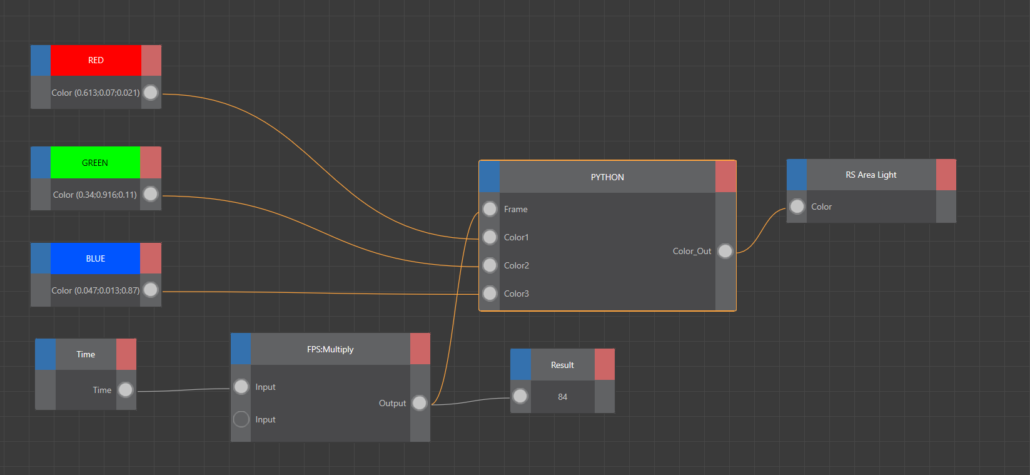
Add Python Node. Delete default inputs and output. Add an integer input and rename it as Frame. And add Color1, Color2, Color3 inputs as Vectors.
Finally we need to add our simple code to switch colors depending on the current frame.
import c4d

def main():
    global Color_Out

    vec1 = c4d.Vector(Color1.x, Color1.y, Color1.z)
    vec2 = c4d.Vector(Color2.x, Color2.y, Color2.z)
    vec3 = c4d.Vector(Color3.x, Color3.y, Color3.z)

    # 2. Force Frame to Integer
    cur_frame = int(Frame)

    # 3. Logic
    if 0 <= cur_frame <= 30:
        Color_Out = vec1
    elif 31 <= cur_frame <= 60:
        Color_Out = vec2
    elif 61 <= cur_frame <= 90:
        Color_Out = vec3
    else:
        # Default White
Color_Out = c4d.Vector(1, 1, 1)To make smooth transition in between colors we can update our code as below:
import c4d

# 1. Helper Function to mix two colors
def mix_vec(v1, v2, factor):
    # Clamp factor between 0.0 and 1.0 to prevent weird colors
    t = max(0.0, min(1.0, factor))
    # Linear Interpolation Formula: V1 * (1-t) + V2 * t
    return v1 * (1.0 - t) + v2 * t

def main():
    global Color_Out

    # 2. Ensure Inputs are Vectors
    vec_red   = c4d.Vector(Color1.x, Color1.y, Color1.z)
    vec_green = c4d.Vector(Color2.x, Color2.y, Color2.z)
    vec_blue  = c4d.Vector(Color3.x, Color3.y, Color3.z)

    # 3. Use Frame as a Float for smooth division
    # (Do not convert to Int, or the color will step/stutter)
    cur_frame = float(Frame)

    # --- LOGIC ---

    # PHASE 1: Frames 0 to 30 (Transition Red -> Green)
    if cur_frame <= 30:
        # Calculate progress:
        # Frame 0 is 0.0, Frame 15 is 0.5, Frame 30 is 1.0
        factor = cur_frame / 30.0
        Color_Out = mix_vec(vec_red, vec_green, factor)

    # PHASE 2: Frames 31 to 60 (Transition Green -> Blue)
    elif cur_frame <= 60:
        # Map the range 30-60 to a 0.0-1.0 scale
        # (Frame - Start) / Duration
        factor = (cur_frame - 30.0) / 30.0
        Color_Out = mix_vec(vec_green, vec_blue, factor)

    # PHASE 3: Frame 61+ (Hold Blue)
    else:
        Color_Out = vec_blue


