One of the most time-consuming tasks in Illustrator is managing selections—especially when working with large grids, checkerboard layouts, or repeated elements. The Advanced Select Every Nth Item v2.0 script solves this problem elegantly, giving designers precise control over how objects are selected. Whether you’re building complex patterns, animating assets, or organizing layouts, this script adds a layer of automation that feels tailor-made for creative workflows.
Key Features
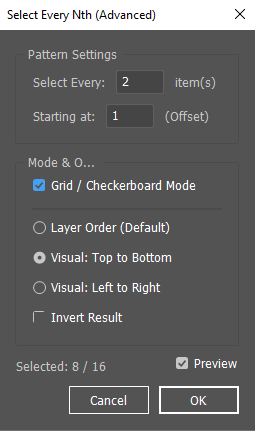
- Nth Item Selection Choose every 2nd, 3rd, or nth item in your selection, starting from a customizable offset.
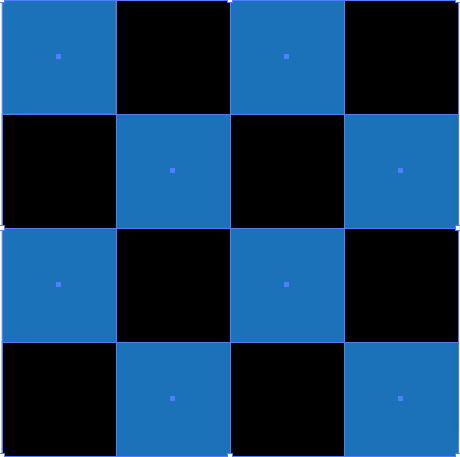
- Grid / Checkerboard Mode Perfect for layouts with rows and columns. The script detects grid structures and applies checkerboard-style selection logic, making it ideal for pattern design.
- Sorting Options
- Layer order (default)
- Visual top-to-bottom
- Visual left-to-right
- Invert Selection Quickly flip your selection logic to grab the opposite set of items.
- Preview & Stats See live updates of how many items are selected, with instant preview toggling to refine your settings before committing.
Why It Matters for Designers
- Pattern Creation Select alternating elements in a grid to apply different colors, strokes, or effects.
- Motion Graphics Prep Export checkerboard selections into After Effects for staggered animations.
- Efficiency Boost Instead of manually clicking through hundreds of objects, automate the process with a few settings.
- Creative Experimentation Invert, offset, and preview selections to discover unexpected visual rhythms.
Workflow Example
Imagine you’ve created a grid of 100 circles. With this script, you can:
- Select every 2nd circle starting from the first → perfect for alternating color fills.
- Switch to Grid Mode → instantly create a checkerboard pattern.
- Invert the selection → grab the opposite set for contrast.
- Preview the results before applying → no guesswork, just precision.
Final Thoughts
The Advanced Select Every Nth Item v2.0 script is a deceptively simple tool that unlocks powerful creative workflows. By automating selection patterns, it saves time and opens new avenues for experimentation. Whether you’re a pattern designer, motion artist, or Illustrator power user, this script is a must-have addition to your toolkit.
/*
  Advanced Select Every Nth Item (v2.0)
  for Adobe Illustrator

  Description: Selects a pattern of items with specific support for Checkerboard/Grid patterns.
  Features: Grid Mode, Sort by position, Preview, Invert, Selection Stats.
*/

(function() {
    var SCRIPT_TITLE = "Select Every Nth (Advanced)";
    var PREFS = {
        nth: 2,
        start: 1,
        gridMode: false,
        sort: 0, // 0=Layer, 1=TopLeft, 2=LeftTop
        invert: false,
        preview: true
    };

    var doc, originalSelection;

    if (app.documents.length === 0) {
        alert("Please open a document first.", SCRIPT_TITLE);
        return;
    }
    doc = app.activeDocument;
    if (doc.selection.length < 2) {
        alert("Please select at least 2 objects.", SCRIPT_TITLE);
        return;
    }

    originalSelection = [];
    for (var i = 0; i < doc.selection.length; i++) {
        originalSelection.push(doc.selection[i]);
    }

    // --- UI Construction ---
    var win = new Window("dialog", SCRIPT_TITLE);
    win.orientation = "column";
    win.alignChildren = ["fill", "top"];
    win.spacing = 10;
    win.margins = 16;

    // Pattern Settings
    var pnlConfig = win.add("panel", undefined, "Pattern Settings");
    pnlConfig.orientation = "column";
    pnlConfig.alignChildren = ["fill", "top"];
    pnlConfig.margins = 15;

    var grpNth = pnlConfig.add("group");
    grpNth.orientation = "row";
    grpNth.add("statictext", undefined, "Select Every:");
    var inpNth = grpNth.add("edittext", undefined, PREFS.nth);
    inpNth.characters = 4;
    grpNth.add("statictext", undefined, "item(s)");

    var grpStart = pnlConfig.add("group");
    grpStart.orientation = "row";
    grpStart.add("statictext", undefined, "Starting at:");
    var inpStart = grpStart.add("edittext", undefined, PREFS.start);
    inpStart.characters = 4;
    grpStart.add("statictext", undefined, "(Offset)");

    // Processing Logic
    var pnlSort = win.add("panel", undefined, "Mode & Order");
    pnlSort.orientation = "column";
    pnlSort.alignChildren = ["left", "top"];
    pnlSort.margins = 15;

    // Grid Checkbox
    var chkGrid = pnlSort.add("checkbox", undefined, "Grid / Checkerboard Mode");
    chkGrid.value = PREFS.gridMode;
    chkGrid.helpTip = "Detects rows and columns to force a checkerboard pattern.";

    var div = pnlSort.add("panel", undefined, undefined);
    div.alignment = "fill";
    div.preferredSize.height = 1;

    // Sorting Options
    var grpSort = pnlSort.add("group");
    grpSort.orientation = "column";
    grpSort.alignChildren = ["left", "top"];
    var radLayer = grpSort.add("radiobutton", undefined, "Layer Order (Default)");
    var radVisualY = grpSort.add("radiobutton", undefined, "Visual: Top to Bottom");
    var radVisualX = grpSort.add("radiobutton", undefined, "Visual: Left to Right");
    radLayer.value = true;

    var chkInvert = pnlSort.add("checkbox", undefined, "Invert Result");

    // Stats & Preview
    var grpStats = win.add("group");
    grpStats.orientation = "row";
    grpStats.alignChildren = ["left", "center"];
    var lblStats = grpStats.add("statictext", undefined, "Selected: " + originalSelection.length);
    lblStats.preferredSize.width = 150;

    var grpRight = grpStats.add("group");
    grpRight.alignment = ["right", "center"];
    var chkPreview = grpRight.add("checkbox", undefined, "Preview");
    chkPreview.value = PREFS.preview;

    var grpBtns = win.add("group");
    grpBtns.orientation = "row";
    grpBtns.alignment = ["right", "bottom"];
    var btnCancel = grpBtns.add("button", undefined, "Cancel");
    var btnOk = grpBtns.add("button", undefined, "OK");

    // --- Events ---
    inpNth.onChange = inpStart.onChange = function() {
        this.text = parseInt(this.text) || 1;
        if (parseInt(this.text) < 1) this.text = 1;
        runLogic();
    };

    chkGrid.onClick = function() {
        // If Grid is on, visual sorting is usually required. Disable Layer sorting to avoid confusion?
        // Let's just keep them enabled but defaults usually work best with Visual Top-Bottom.
        if(this.value && radLayer.value) {
            radVisualY.value = true;
        }
        runLogic();
    }

    radLayer.onClick = radVisualY.onClick = radVisualX.onClick = chkInvert.onClick = function() { runLogic(); };
    chkPreview.onClick = function() {
        if (!this.value) { doc.selection = originalSelection; lblStats.text = "Preview Off"; }
        else { runLogic(); }
    };

    btnCancel.onClick = function() { doc.selection = originalSelection; win.close(); };
    btnOk.onClick = function() { win.close(); };

    // --- Helpers ---
    function getCenter(item) {
        return {
            x: item.left + item.width / 2,
            y: item.top - item.height / 2
        };
    }

    // --- Core Logic ---
    function runLogic() {
        if (!chkPreview.value) return;

        var n = parseInt(inpNth.text);
        var start = parseInt(inpStart.text);
        var invert = chkInvert.value;
        var useGrid = chkGrid.value;

        var procArray = originalSelection.slice(0);
        var finalSelection = [];

        // 1. GRID MODE LOGIC
        if (useGrid) {
            // Sort by Y first to find rows
            procArray.sort(function(a, b) { return b.top - a.top; });

            var rows = [];
            if(procArray.length > 0){
                var currentRow = [procArray[0]];
                var rowY = procArray[0].top;

                for(var i=1; i<procArray.length; i++){
                    var item = procArray[i];
                    // If this item overlaps vertically with the current row's representative Y (within 50% height)
                    // We consider it the same row.
                    if (item.top >= (rowY - (item.height/2)) && item.top <= (rowY + (item.height/2)) ) {
                        currentRow.push(item);
                    } else {
                        // New Row
                        rows.push(currentRow);
                        currentRow = [item];
                        rowY = item.top;
                    }
                }
                rows.push(currentRow);
            }

            // Sort items inside rows by X (Left to Right)
            for(var r=0; r<rows.length; r++){
                rows[r].sort(function(a,b){ return a.left - b.left; });
            }

            // Apply Math: (RowIndex + ColIndex) % n
            for(var r=0; r<rows.length; r++){
                var rowItems = rows[r];
                for(var c=0; c<rowItems.length; c++){
                    // Math Logic for Checkerboard
                    // We add (start-1) to shift the phase
                    // For "Every 2nd" (N=2), a pure checkerboard is (r+c)%2.

                    var gridVal = (r + c) + (start - 1); // Phase shift
                    var isTarget = (gridVal % n) === 0;

                    if(invert) isTarget = !isTarget;
                    if(isTarget) finalSelection.push(rowItems[c]);
                }
            }

        } else {
            // 2. LINEAR MODE LOGIC (Standard)

            if (radVisualY.value) {
                procArray.sort(function(a, b) {
                    var yDiff = Math.round(b.top) - Math.round(a.top);
                    if (yDiff !== 0) return yDiff;
                    return Math.round(a.left) - Math.round(b.left);
                });
            } else if (radVisualX.value) {
                procArray.sort(function(a, b) {
                    var xDiff = Math.round(a.left) - Math.round(b.left);
                    if (xDiff !== 0) return xDiff;
                    return Math.round(b.top) - Math.round(a.top);
                });
            }

            for (var i = 0; i < procArray.length; i++) {
                var index = i + 1;
                var isTarget = false;
                if (index >= start) {
                    if ((index - start) % n === 0) isTarget = true;
                }
                if (invert) isTarget = !isTarget;
                if (isTarget) finalSelection.push(procArray[i]);
            }
        }

        // Apply
        doc.selection = null;
        for(var k=0; k<finalSelection.length; k++){
            finalSelection[k].selected = true;
        }

        lblStats.text = "Selected: " + finalSelection.length + " / " + originalSelection.length;
        app.redraw();
    }

    runLogic();
    win.show();
})();