Smart Lighting in Cinema 4D: Python-Driven XPresso Workflows
Lighting in 3D scenes is often a balancing act between realism, control, and efficiency. Traditional workflows rely on manual adjustments, but with Python scripting inside Cinema 4D’s XPresso, we can automate intelligent behaviors that adapt to geometry, camera position, and scene context.
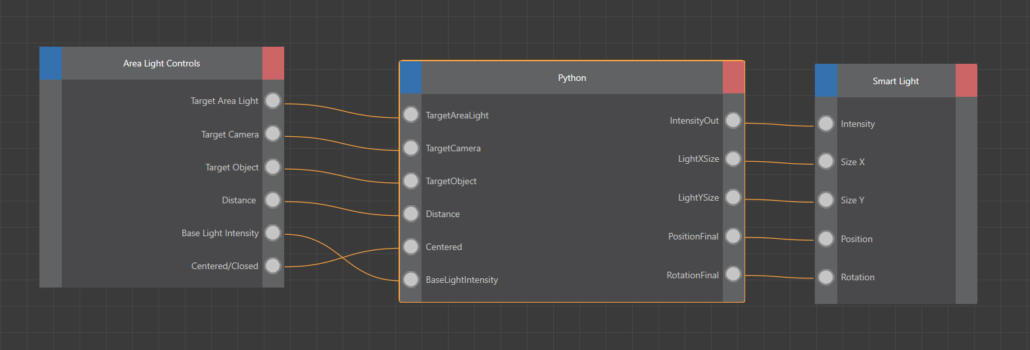
In this post, we’ll explore a Python node setup that dynamically drives an Area Light using object bounding boxes, camera orientation, and inverse-square intensity falloff. The screenshot illustrates the node network: Area Light Controls feed parameters into a Python node, which outputs size, intensity, position, and rotation to a Smart Light node.
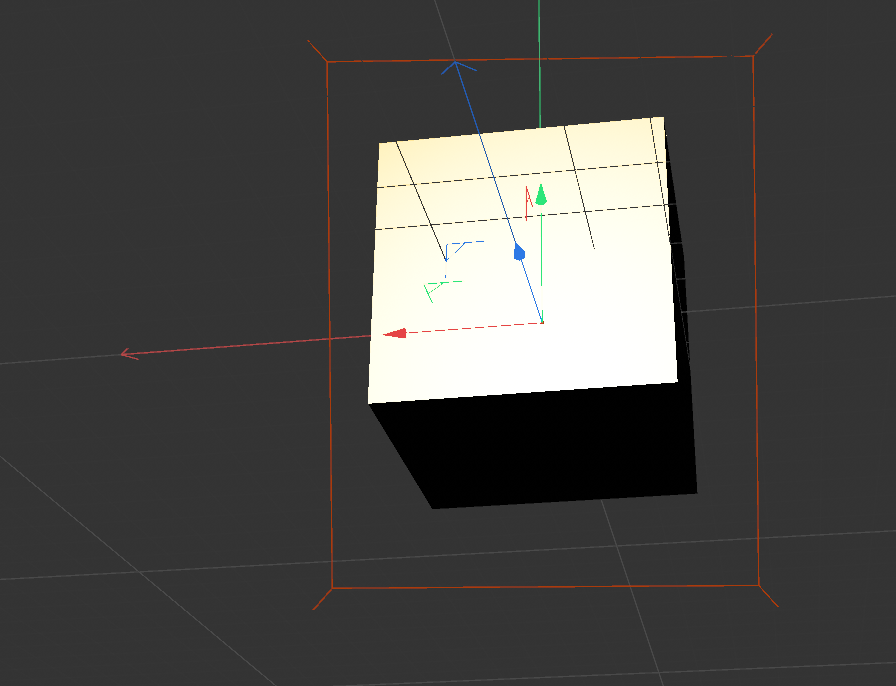
Key Concepts in the Script
1. Bounding Box Geometry
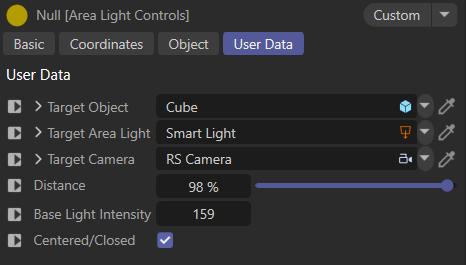
The script calculates the global corners of the target object and its bounding box center. This allows the light to adapt to the object’s scale and orientation, ensuring coverage without manual tweaking.
global_corners = GetGlobalCorners(TargetObject)
world_bbox_center = GetWorldBBoxCenter(TargetObject)
2. Camera-Aware Positioning
Instead of placing the light arbitrarily, the script computes a position on the camera-facing side of the object. This ensures the light always illuminates the visible geometry.
aim_pos = GetClosestFaceCenter(TargetObject, TargetCamera.GetMg().off, world_bbox_center)
3. Matrix Blending
The script blends between the camera’s matrix and a target-facing matrix using spherical interpolation (slerp). This creates smooth transitions when animating distance percentages.
blended_mg = BlendMatrix(mg_cam, mg_b, dist_pct)
4. Adaptive Light Size
By projecting object corners into the light’s local XY plane, the script calculates the required light dimensions to cover the object with a margin.
size_x, size_y = ProjectCornersToLightXY(global_corners, ~blended_mg)
5. Physically-Based Intensity
Intensity is scaled using an inverse-square law relative to the object’s bounding sphere radius, producing realistic falloff behavior.
intensity = base_intensity * (light_to_aim / obj_sphere_radius) ** 2
Why This Matters
This workflow transforms lights into smart scene participants rather than static objects. By combining geometry analysis, camera awareness, and mathematical blending, you gain:
- Automation: Lights adapt automatically to scene changes.
- Consistency: Coverage and intensity remain physically plausible.
- Efficiency: Reduced manual adjustments during animation or layout changes.
Conclusion
Cinema 4D’s Python integration inside XPresso opens the door to procedural lighting systems that respond intelligently to scene context. This script demonstrates how to merge math, geometry, and rendering principles into a reusable lighting tool. Whether you’re building cinematic shots or product visualizations, smart lights can save time while improving quality.
import c4d
import math

# Output port globals
LightXSize    = 0.0
LightYSize    = 0.0
IntensityOut  = 0.0
PositionFinal = c4d.Vector(0)
RotationFinal = c4d.Vector(0)

DEBUG = True

def dbg(msg):
    if DEBUG:
        print("[XP] " + str(msg))


def GetGlobalCorners(obj):
    if not obj:
        return []
    mg     = obj.GetMg()
    rad    = obj.GetRad()
    center = obj.GetMp()
    corners = []
    for sx in (1, -1):
        for sy in (1, -1):
            for sz in (1, -1):
                corners.append(mg * c4d.Vector(
                    center.x + sx * rad.x,
                    center.y + sy * rad.y,
                    center.z + sz * rad.z
                ))
    return corners


def GetWorldBBoxCenter(obj):
    return obj.GetMg() * obj.GetMp()


def GetClosestFaceCenter(obj, cam_pos, world_bbox_center):
    mg   = obj.GetMg()
    rad  = obj.GetRad()
    to_cam = (cam_pos - world_bbox_center).GetNormalized()
    axes   = [mg.v1, mg.v2, mg.v3]
    rads   = [rad.x, rad.y, rad.z]
    best_dot  = -1e9
    best_face = world_bbox_center
    for i in range(3):
        axis_n = axes[i].GetNormalized()
        for sign in (1, -1):
            face_n = axis_n * sign
            d = face_n.Dot(to_cam)
            if d > best_dot:
                best_dot  = d
                best_face = world_bbox_center + face_n * rads[i]
    return best_face


def BuildLookAt(from_pos, to_pos):
    """Build matrix and HPB with +Z pointing from from_pos toward to_pos."""
    fwd = to_pos - from_pos
    if fwd.GetLength() < 0.0001:
        return None, None
    fwd = fwd.GetNormalized()
    world_up = c4d.Vector(0, 1, 0)
    if abs(fwd.Dot(world_up)) > 0.9999:
        world_up = c4d.Vector(0, 0, 1)
    right  = world_up.Cross(fwd).GetNormalized()
    up     = fwd.Cross(right).GetNormalized()
    mg     = c4d.Matrix()
    mg.off = from_pos
    mg.v1  = right
    mg.v2  = up
    mg.v3  = fwd
    return mg, c4d.utils.MatrixToHPB(mg, c4d.ROTATIONORDER_DEFAULT)


def SlerpVector(v1, v2, t):
    """
    Spherical interpolation between two direction vectors.
    Used to smoothly blend rotation axes (v1, v2, v3) of two matrices.
    Falls back to linear+normalize when vectors are nearly parallel.
    """
    v1 = v1.GetNormalized()
    v2 = v2.GetNormalized()
    dot = max(-1.0, min(1.0, v1.Dot(v2)))
    if abs(dot) > 0.9999:
        # Nearly parallel — linear interpolation + normalize
        r = v1 + (v2 - v1) * t
        l = r.GetLength()
        return r * (1.0 / l) if l > 0.0001 else v2
    angle  = math.acos(dot)
    sin_a  = math.sin(angle)
    w1     = math.sin((1.0 - t) * angle) / sin_a
    w2     = math.sin(t * angle) / sin_a
    return v1 * w1 + v2 * w2


def BlendMatrix(mg_a, mg_b, t):
    """
    Blend two matrices by:
    - Lerp positions
    - Slerp each axis (v1, v2, v3) independently
    - Re-orthogonalize to avoid shear/scale drift
    Returns blended matrix.
    """
    # Position — linear
    pos = mg_a.off + (mg_b.off - mg_a.off) * t

    # Slerp each axis
    v3 = SlerpVector(mg_a.v3, mg_b.v3, t)  # forward
    v1 = SlerpVector(mg_a.v1, mg_b.v1, t)  # right

    # Re-orthogonalize: recompute up from forward x right, then recompute right
    v2 = v3.Cross(v1).GetNormalized()
    v1 = v2.Cross(v3).GetNormalized()

    mg     = c4d.Matrix()
    mg.off = pos
    mg.v1  = v1
    mg.v2  = v2
    mg.v3  = v3
    return mg


def ProjectCornersToLightXY(corners, inv_light_mg):
    min_x = min_y =  1e18
    max_x = max_y = -1e18
    for p in corners:
        lp = inv_light_mg * p
        if lp.x < min_x: min_x = lp.x
        if lp.x > max_x: max_x = lp.x
        if lp.y < min_y: min_y = lp.y
        if lp.y > max_y: max_y = lp.y
    return (max_x - min_x) * 1.10, (max_y - min_y) * 1.10


def main():
    global LightXSize, LightYSize, IntensityOut, PositionFinal, RotationFinal

    if not TargetCamera or not TargetObject:
        dbg("ABORT - missing TargetCamera or TargetObject")
        return

    dist_pct       = max(0.0, min(float(Distance           if Distance           is not None else 0.5), 1.0))
    base_intensity = float(BaseLightIntensity if BaseLightIntensity is not None else 1.0)
    use_centered   = bool(Centered)           if Centered           is not None else True

    frame   = doc.GetTime().GetFrame(doc.GetFps())

    # ------------------------------------------------------------------
    # Object geometry
    # ------------------------------------------------------------------
    global_corners    = GetGlobalCorners(TargetObject)
    if not global_corners:
        dbg("ABORT - no bounding box corners")
        return

    world_bbox_center = GetWorldBBoxCenter(TargetObject)
    rad               = TargetObject.GetRad()
    obj_sphere_radius = max(math.sqrt(rad.x**2 + rad.y**2 + rad.z**2), 0.001)
    clearance         = obj_sphere_radius * 0.15

    # aim_pos: the point the light focuses on (center or closest face)
    if use_centered:
        aim_pos = world_bbox_center
    else:
        aim_pos = GetClosestFaceCenter(
            TargetObject, TargetCamera.GetMg().off, world_bbox_center
        )

    # ------------------------------------------------------------------
    # Matrix A — Camera
    # Position : camera world position
    # Rotation : camera world rotation (it already faces the scene)
    # ------------------------------------------------------------------
    mg_cam = TargetCamera.GetMg()

    # ------------------------------------------------------------------
    # Matrix B — "In front of target"
    # Position : outside the bbox surface on the camera side
    #            = aim_pos + (cam_dir * (obj_sphere_radius + clearance))
    # Rotation : facing directly toward aim_pos from that position
    #
    # We derive cam_dir from the camera position relative to aim_pos
    # so Matrix B always sits on the camera-facing side of the object
    # ------------------------------------------------------------------
    cam_to_aim     = aim_pos - mg_cam.off
    cam_to_aim_len = cam_to_aim.GetLength()
    if cam_to_aim_len < 0.0001:
        dbg("ABORT - camera at aim point")
        return
    cam_to_aim_dir = cam_to_aim * (1.0 / cam_to_aim_len)

    # B position: just outside the bbox surface, on camera side
    b_pos          = aim_pos - cam_to_aim_dir * (obj_sphere_radius + clearance)

    mg_b, _        = BuildLookAt(b_pos, aim_pos)
    if mg_b is None:
        dbg("ABORT - cannot build target matrix")
        return

    # ------------------------------------------------------------------
    # Blend: dist=0.0 → camera matrix, dist=1.0 → target matrix
    # ------------------------------------------------------------------
    blended_mg  = BlendMatrix(mg_cam, mg_b, dist_pct)
    light_pos   = blended_mg.off
    light_to_aim = max((aim_pos - light_pos).GetLength(), 0.001)

    hpb = c4d.utils.MatrixToHPB(blended_mg, c4d.ROTATIONORDER_DEFAULT)

    # ------------------------------------------------------------------
    # Size — project bbox onto blended light XY plane
    # ------------------------------------------------------------------
    size_x, size_y = ProjectCornersToLightXY(global_corners, ~blended_mg)

    # ------------------------------------------------------------------
    # Intensity — inverse-square relative to obj_sphere_radius
    # ------------------------------------------------------------------
    intensity = base_intensity * (light_to_aim / obj_sphere_radius) ** 2
    intensity = max(0.0001, min(intensity, 999999999.0))

    dbg(
        "F" + str(frame) +
        " | " + ("CENTER" if use_centered else "CLOSEST") +
        " | dist=" + str(round(dist_pct, 3)) +
        " | light->aim=" + str(round(light_to_aim, 1)) +
        " | obj_r=" + str(round(obj_sphere_radius, 1)) +
        " | base=" + str(round(base_intensity, 1)) +
        " | out=" + str(round(intensity, 1)) +
        " | size=(" + str(round(size_x, 1)) + "," + str(round(size_y, 1)) + ")"
    )

    LightXSize    = size_x
    LightYSize    = size_y
    IntensityOut  = intensity
    PositionFinal = light_pos
    RotationFinal = hpb