

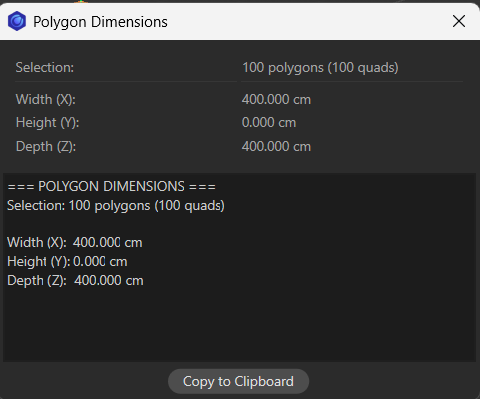
For motion designers working in Cinema 4D, precision and control are key. When creating complex models or working with polygon-heavy assets, knowing the exact dimensions of your geometry can save hours of guesswork and prevent scaling issues down the line. That’s where the Cinema 4D Polygon Dimension Calculator comes in — a lightweight, easy-to-use Python Tag that instantly calculates the dimensions of any selected polygon or group of polygons, displays them in a handy dialog, and even copies the results directly to your clipboard.
Why You Need This Tool
When animating or modeling, you often face questions like:
- How wide is this polygon?
- What is the height of this selection in world units?
- How deep does this mesh extend along the Z-axis?
While Cinema 4D provides the point and polygon data, manually calculating dimensions is tedious, especially when dealing with multiple selections. This Python Tag automates the process, giving you:
- Width (X), Height (Y), Depth (Z) for any polygon or selection.
- Combined dimensions for multiple polygons, including counts of quads and triangles.
- A ready-to-copy report for use in project documentation or production notes.
How It Works
Once installed as a Python Tag on your object:
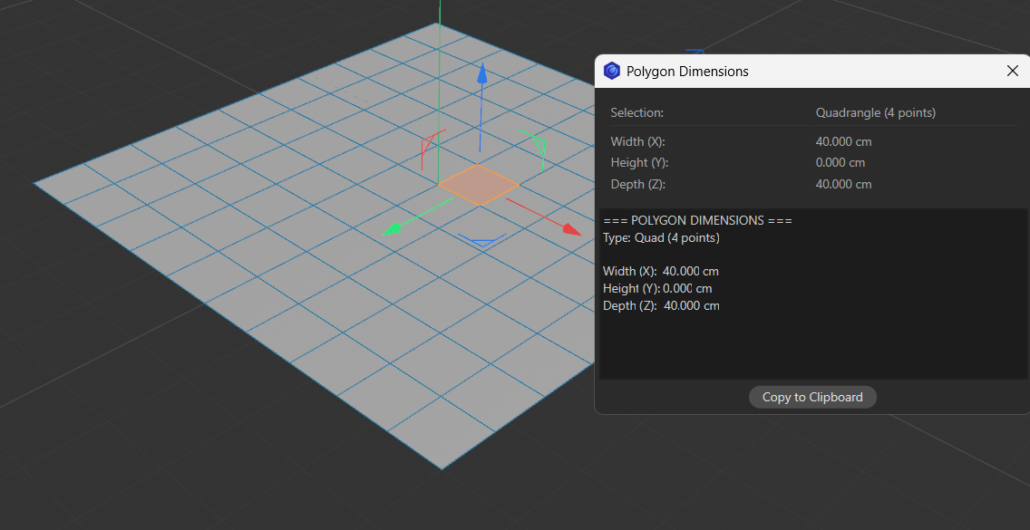
- Select the polygon(s) you want to measure.
- Run the tag — it will instantly calculate the bounding box of your selection.
- A dialog displays the width, height, and depth of your polygon(s), along with a summary of the type (quad or triangle) and number of points.
- One click copies all the data to your clipboard for fast reporting or reference.
Even if you work on a massive asset with hundreds of polygons, this tool simplifies measurements, ensuring your designs remain precise and consistent across scenes.
Features That Motion Designers Will Love
- Automatic clipboard integration: Copy results instantly without manual typing.
- Combined selection analysis: Measure multiple polygons in one go.
- Triangle and quad recognition: Know exactly what type of polygons you’re working with.
- Global coordinates calculation: Works regardless of object position, rotation, or scale.
- Cross-platform compatibility: Uses either
pyperclip,tkinter, or Cinema 4D’s built-in clipboard.
Workflow Example
Imagine you’re working on a motion design project with a detailed abstract mesh. You need to ensure a series of panels fit precisely within a frame. By selecting the relevant polygons and running the Polygon Dimension Calculator, you immediately know the exact width, height, and depth of each panel. You can then adjust scaling, spacing, or animation timing with complete confidence.
No more guesswork, no more manual calculations — just instant precision.
Getting Started
- Download or copy the Python Tag script into Cinema 4D.
- Add the tag to the object you want to analyze.
- Select your polygons in Polygon Mode.
- Run the script — your dimensions will appear in a dialog, ready for use.
Whether you’re prepping assets for Redshift rendering, creating intricate motion graphics, or working on hard-surface modeling, this tool integrates seamlessly into your workflow, improving both speed and accuracy.
"""
Cinema 4D Polygon Dimension Calculator
Calculates dimensions of selected polygon(s)
Displays results in dialog and copies to clipboard
"""

import c4d
from c4d import gui
import math

# Import clipboard functionality
try:
    # Try pyperclip (if available)
    import pyperclip
    CLIPBOARD_METHOD = 'pyperclip'
except ImportError:
    try:
        # Try tkinter (cross-platform)
        import tkinter as tk
        CLIPBOARD_METHOD = 'tkinter'
    except ImportError:
        CLIPBOARD_METHOD = None


def copy_to_clipboard(text):
    """Copy text to system clipboard using available method"""
    global CLIPBOARD_METHOD

    if CLIPBOARD_METHOD == 'pyperclip':
        try:
            pyperclip.copy(text)
            return True
        except:
            CLIPBOARD_METHOD = 'tkinter'

    if CLIPBOARD_METHOD == 'tkinter':
        try:
            root = tk.Tk()
            root.withdraw()  # Hide the window
            root.clipboard_clear()
            root.clipboard_append(text)
            root.update()  # Required to make it work
            root.destroy()
            return True
        except Exception as e:
            print("Tkinter clipboard error:", str(e))
            CLIPBOARD_METHOD = None

    # Fallback: Use Cinema 4D's clipboard (for text)
    if CLIPBOARD_METHOD is None:
        try:
            c4d.CopyStringToClipboard(text)
            return True
        except:
            return False

    return False


def get_polygon_dimensions(obj, poly_index):
    """
    Calculate dimensions of a single selected polygon
    Returns: dict with width, depth, height
    """
    if not obj or poly_index < 0:
        return None

    # Get the specific polygon
    poly = obj.GetPolygon(poly_index)
    all_points = obj.GetAllPoints()

    # Get ONLY the points for THIS polygon (not all object points)
    if poly.c == poly.d:  # Triangle
        point_indices = [poly.a, poly.b, poly.c]
        is_quad = False
    else:  # Quad
        point_indices = [poly.a, poly.b, poly.c, poly.d]
        is_quad = True

    # Get the actual point coordinates for this polygon only
    poly_points = [all_points[i] for i in point_indices]

    # Transform to global coordinates
    mg = obj.GetMg()
    poly_points_global = [mg * p for p in poly_points]

    # Calculate bounding box dimensions FROM THESE POINTS ONLY
    min_x = min(p.x for p in poly_points_global)
    max_x = max(p.x for p in poly_points_global)
    min_y = min(p.y for p in poly_points_global)
    max_y = max(p.y for p in poly_points_global)
    min_z = min(p.z for p in poly_points_global)
    max_z = max(p.z for p in poly_points_global)

    # Calculate dimensions (X, Y, Z) - no scaling needed
    width_x = max_x - min_x
    height_y = max_y - min_y
    depth_z = max_z - min_z

    return {
        'width_x': width_x,
        'height_y': height_y,
        'depth_z': depth_z,
        'is_quad': is_quad,
        'point_count': len(poly_points_global),
        'poly_index': poly_index
    }


def get_combined_dimensions(obj, poly_indices):
    """
    Calculate combined bounding box dimensions for multiple selected polygons
    Returns: dict with width, depth, height
    """
    if not obj or not poly_indices:
        return None

    all_points = obj.GetAllPoints()
    mg = obj.GetMg()

    # Collect all points from all selected polygons
    all_poly_points = []
    quad_count = 0
    tri_count = 0

    for poly_index in poly_indices:
        poly = obj.GetPolygon(poly_index)

        # Get points for this polygon
        if poly.c == poly.d:  # Triangle
            point_indices = [poly.a, poly.b, poly.c]
            tri_count += 1
        else:  # Quad
            point_indices = [poly.a, poly.b, poly.c, poly.d]
            quad_count += 1

        # Get the actual point coordinates for this polygon
        poly_points = [all_points[i] for i in point_indices]

        # Transform to global coordinates
        poly_points_global = [mg * p for p in poly_points]
        all_poly_points.extend(poly_points_global)

    # Calculate bounding box dimensions from ALL collected points
    min_x = min(p.x for p in all_poly_points)
    max_x = max(p.x for p in all_poly_points)
    min_y = min(p.y for p in all_poly_points)
    max_y = max(p.y for p in all_poly_points)
    min_z = min(p.z for p in all_poly_points)
    max_z = max(p.z for p in all_poly_points)

    # Calculate dimensions (X, Y, Z)
    width_x = max_x - min_x
    height_y = max_y - min_y
    depth_z = max_z - min_z

    return {
        'width_x': width_x,
        'height_y': height_y,
        'depth_z': depth_z,
        'is_quad': quad_count > 0,
        'point_count': len(all_poly_points),
        'poly_count': len(poly_indices),
        'quad_count': quad_count,
        'tri_count': tri_count
    }


class PolygonDimensionsDialog(gui.GeDialog):
    """Dialog to display polygon dimensions"""

    ID_WIDTH = 1000
    ID_HEIGHT = 1001
    ID_DEPTH = 1002
    ID_TYPE = 1003
    ID_COPY_BTN = 1004
    ID_TEXT_FIELD = 1005

    def __init__(self, dimensions, clipboard_text):
        super(PolygonDimensionsDialog, self).__init__()
        self.dimensions = dimensions
        self.clipboard_text = clipboard_text

    def CreateLayout(self):
        """Create dialog layout"""
        self.SetTitle("Polygon Dimensions")

        if not self.dimensions:
            self.AddStaticText(0, c4d.BFH_CENTER, name="No valid polygon selected")
            return True

        d = self.dimensions

        # Main group
        self.GroupBegin(0, c4d.BFH_SCALEFIT | c4d.BFV_SCALEFIT, cols=2, rows=0)
        self.GroupBorderSpace(10, 10, 10, 10)

        # Polygon type/count
        self.AddStaticText(0, c4d.BFH_LEFT, name="Selection:")
        if d.get('poly_count', 1) > 1:
            type_str = f"{d['poly_count']} polygons"
            if d['quad_count'] > 0 and d['tri_count'] > 0:
                type_str += f" ({d['quad_count']} quads, {d['tri_count']} triangles)"
            elif d['quad_count'] > 0:
                type_str += f" ({d['quad_count']} quads)"
            else:
                type_str += f" ({d['tri_count']} triangles)"
        else:
            poly_type = "Quadrangle" if d['is_quad'] else "Triangle"
            type_str = f"{poly_type} ({d['point_count']} points)"

        self.AddStaticText(self.ID_TYPE, c4d.BFH_LEFT, name=type_str)

        # Separator
        self.AddSeparatorH(0, c4d.BFH_SCALEFIT)
        self.AddSeparatorH(0, c4d.BFH_SCALEFIT)

        # Dimensions
        self.AddStaticText(0, c4d.BFH_LEFT, name="Width (X):")
        self.AddStaticText(self.ID_WIDTH, c4d.BFH_LEFT, name=f"{d['width_x']:.3f} cm")

        self.AddStaticText(0, c4d.BFH_LEFT, name="Height (Y):")
        self.AddStaticText(self.ID_HEIGHT, c4d.BFH_LEFT, name=f"{d['height_y']:.3f} cm")

        self.AddStaticText(0, c4d.BFH_LEFT, name="Depth (Z):")
        self.AddStaticText(self.ID_DEPTH, c4d.BFH_LEFT, name=f"{d['depth_z']:.3f} cm")

        self.GroupEnd()

        # Add multiline text field with all data (for manual copy if clipboard fails)
        self.AddMultiLineEditText(self.ID_TEXT_FIELD, c4d.BFH_SCALEFIT | c4d.BFV_SCALEFIT,
                                   initw=400, inith=100, style=c4d.DR_MULTILINE_READONLY)
        self.SetString(self.ID_TEXT_FIELD, self.clipboard_text)

        # Copy button
        self.AddButton(self.ID_COPY_BTN, c4d.BFH_CENTER, name="Copy to Clipboard")

        return True

    def Command(self, id, msg):
        """Handle button clicks"""
        if id == self.ID_COPY_BTN:
            success = copy_to_clipboard(self.clipboard_text)
            if success:
                gui.MessageDialog("Dimensions copied to clipboard!")
            else:
                gui.MessageDialog("Could not access clipboard automatically.\nPlease select and copy the text manually from the text field above.")

        return True


def format_dimensions_string(dimensions):
    """Format dimensions as a string for clipboard"""
    if not dimensions:
        return "No dimensions available"

    d = dimensions

    output = []
    output.append("=== POLYGON DIMENSIONS ===")

    # Type/count info
    if d.get('poly_count', 1) > 1:
        type_str = f"Selection: {d['poly_count']} polygons"
        if d['quad_count'] > 0 and d['tri_count'] > 0:
            type_str += f" ({d['quad_count']} quads, {d['tri_count']} triangles)"
        elif d['quad_count'] > 0:
            type_str += f" ({d['quad_count']} quads)"
        else:
            type_str += f" ({d['tri_count']} triangles)"
        output.append(type_str)
    else:
        poly_type = "Quad" if d['is_quad'] else "Triangle"
        output.append(f"Type: {poly_type} ({d['point_count']} points)")

    output.append("")
    output.append(f"Width (X):  {d['width_x']:.3f} cm")
    output.append(f"Height (Y): {d['height_y']:.3f} cm")
    output.append(f"Depth (Z):  {d['depth_z']:.3f} cm")

    return "\n".join(output)


def main():
    """Main script execution"""
    doc = c4d.documents.GetActiveDocument()
    obj = doc.GetActiveObject()

    if not obj:
        gui.MessageDialog("Please select an object with polygons.")
        return

    if not obj.IsInstanceOf(c4d.Opolygon):
        gui.MessageDialog("Selected object is not a polygon object.")
        return

    # Get polygon selection
    poly_sel = obj.GetPolygonS()
    selected_polys = poly_sel.GetAll(obj.GetPolygonCount())

    # Find all selected polygons
    selected_indices = []
    for i, selected in enumerate(selected_polys):
        if selected:
            selected_indices.append(i)

    if not selected_indices:
        gui.MessageDialog("Please select at least one polygon in Polygon Mode.")
        return

    # Calculate dimensions
    if len(selected_indices) == 1:
        # Single polygon - show individual dimensions
        dimensions = get_polygon_dimensions(obj, selected_indices[0])
    else:
        # Multiple polygons - show combined bounding box
        dimensions = get_combined_dimensions(obj, selected_indices)

    if not dimensions:
        gui.MessageDialog("Error calculating polygon dimensions.")
        return

    # Format clipboard text
    clipboard_text = format_dimensions_string(dimensions)

    # Try to copy to clipboard automatically
    copy_success = copy_to_clipboard(clipboard_text)

    # Show dialog
    dlg = PolygonDimensionsDialog(dimensions, clipboard_text)
    dlg.Open(c4d.DLG_TYPE_MODAL, defaultw=400, defaulth=300)

    # Show message about clipboard if it was successful
    if copy_success:
        print("Dimensions automatically copied to clipboard!")


if __name__ == '__main__':
    main()


