


Speed Up Your C4D Workflow: Free Python Script to Create 3D Halftone Art from Any Image
In the world of motion design, being able to quickly create complex and eye-catching patterns is always a plus. Classic “halftone” effects come to mind, especially when we want to create these patterns based on an image or texture. But what if you could do this within Cinema 4D, fully procedural, and fully compatible with 3D rendering engines (Redshift, Octane, etc.)?
That’s where this powerful Python Generator script we’ve shared comes in.
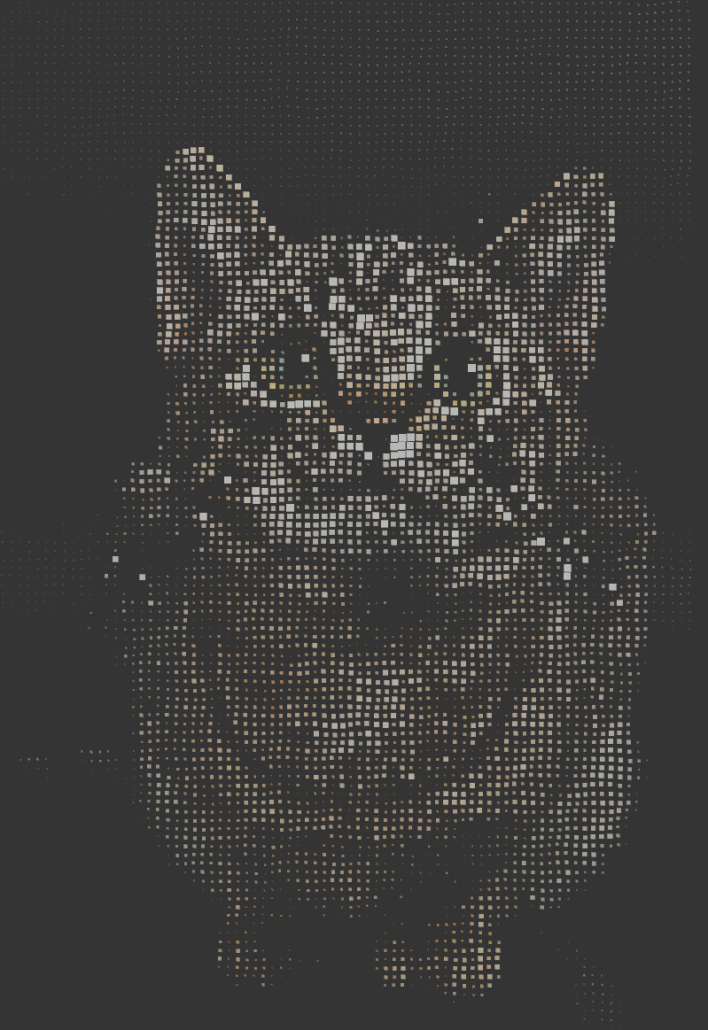
What Exactly Does This Script Do?
This Python script runs inside a Cinema 4D Python Generator object to analyze any image you provide. It then divides the image into a grid and creates a 3D object (sphere, cube, plane, etc.) for each grid cell.
The real magic is this: The script reads the brightness value of the image at that point and uses this value to determine the scale, or Z-axis position, of the generated object.
Not only that, it assigns each object a Vertex Color Label containing the color at that pixel of the image. This provides incredible flexibility during the shading phase.
🚀 Why Use This Script? (Main Features)
This script offers some key advantages that C4D’s standard Mograph tools can’t or wouldn’t take too long to do:
- Halftone vs. Displacement: It doesn’t just change the size (scale) of objects. Thanks to the
Z Extrude Modeoption, you can also use the brightness value to change the position of objects on the Z-axis. This allows you to create 3D displacement effects instantly. - Vertex Color Output: This is the script’s most powerful feature. Vertex Color labels assigned to each object can be directly read by modern render engines like Redshift or Octane. In Redshift, you can use a
VertexAttributenode to bind this color data to any channel of your material (e.g.,diffuse color) and project your source image directly onto your 3D objects. - Mograph and Voronoi Compatible: Instead of one massive object, the script creates individual objects for each grid cell. This means you can instantly throw all these objects into a Voronoi Fracture, apply Mograph effectors to them, or include them in dynamic simulations.
- Different Object Types: You’re not limited to just spheres. The script supports different primitive shapes, such as Plane, Sphere, Cube, Cylinder, and Cone.
- Full Control: You have full control over many parameters, such as grid density, sampling mode (center, average, brightest), minimum/maximum dimensions, and object segments.
🛠️ How to Use (Step-by-Step)
Using this script is easier than you think:
- Create a Python Generator: In Cinema 4D, create a new Python Generator object from the
Extensions > Python Generatormenu (orCreate > Generator > Python). - Paste the Script: Select the Python Generator object you created and go to the Script tab in the Attributes panel. Paste the entire code below into this field.
- Configure Settings: In the Attributes panel, go to the User Data tab. When you paste the script, you’ll see all the settings appear here, as shown in the image.
- Image Path: Select the image you want to use to create the effect.
- Grid Columns/Rows: Specify the resolution of the grid to be created. (You can leave Auto Proportional checked for automatic aspect ratio.)
- Shape Type: Select the shape of the 3D object to be created (Plane, Sphere, Cube, etc.).
- Use Vertex Colors: Ensure this is checked to use color data in rendering.
- Z Extrude Mode: If checked, objects will move along the Z-axis instead of scaling (displacement effect).
- Rotation Offset: Allows you to set the default rotation of created objects (especially planes).
That’s all! Your scene should now be filled with thousands of 3D objects based on your image.
💡 Creative Ideas
- Abstract Typography: Render text in black and white and use it in this script to create 3D typographic artwork.
- Data Visualization: Transform complex datasets or maps into 3D “displacement” maps.
- Fracture Effects: Throw created objects into a Voronoi Fracture and animate disintegration with a ‘Plain’ effector.
- Advanced Shading: In Redshift you can set the VertexAttribute node not only to color, but also to ‘Opacity’ or ‘Emission’.
import c4d
from c4d import Vector, bitmaps
import math, hashlib

_bitmap_cache = {}

def get_cache_key(path, invert):
    if not path: return None
    return hashlib.md5(f"{path}_{invert}".encode()).hexdigest()

def load_bitmap(path, cache_key):
    if cache_key in _bitmap_cache:
        return _bitmap_cache[cache_key]
    import os
    if not os.path.isabs(path):
        doc = c4d.documents.GetActiveDocument()
        if doc:
            doc_path = doc.GetDocumentPath()
            if doc_path:
                full = os.path.join(doc_path, path)
                if os.path.exists(full): path = full
    if not os.path.exists(path):
        print("❌ Bitmap not found:", path); return None
    bmp = bitmaps.BaseBitmap(); res, _ = bmp.InitWith(path)
    if res != c4d.IMAGERESULT_OK:
        print("❌ Bitmap load failed"); return None
    _bitmap_cache[cache_key] = bmp
    return bmp

def get_pixel_safe(bmp, x, y, bw, bh):
    x = max(0, min(int(x), bw-1)); y = max(0, min(int(y), bh-1))
    r,g,b = bmp.GetPixel(x,y)
    return Vector(r/255.0, g/255.0, b/255.0)

def calculate_brightness(col):
    return 0.299*col.x + 0.587*col.y + 0.114*col.z

def sample_region(bmp,x1,y1,x2,y2,bw,bh,mode):
    if mode==1:
        c = get_pixel_safe(bmp,(x1+x2)/2,(y1+y2)/2,bw,bh)
        return calculate_brightness(c),c
    colors=[]; br=[]
    s=4; dx=(x2-x1)/s; dy=(y2-y1)/s
    for i in range(s):
        for j in range(s):
            c=get_pixel_safe(bmp,x1+(i+0.5)*dx,y1+(j+0.5)*dy,bw,bh)
            colors.append(c); br.append(calculate_brightness(c))
    if not br: return 0.0,Vector(0.5)
    avg=Vector(sum(c.x for c in colors)/len(colors),
               sum(c.y for c in colors)/len(colors),
               sum(c.z for c in colors)/len(colors))
    if mode==2: b=max(br)
    elif mode==3: b=min(br)
    else: b=sum(br)/len(br)
    return b,avg

def create_sphere_primitive(r, segs):
    segs=max(4,segs); rings=segs//2; pts=[]; polys=[]
    pts.append(Vector(0,r,0))
    for ring in range(1,rings):
        phi=math.pi*ring/rings
        for s in range(segs):
            th=2*math.pi*s/segs
            pts.append(Vector(r*math.sin(phi)*math.cos(th),
                              r*math.cos(phi),
                              r*math.sin(phi)*math.sin(th)))
    pts.append(Vector(0,-r,0))
    for s in range(segs):
        n=(s+1)%segs; polys.append(c4d.CPolygon(0,s+1,n+1,n+1))
    for ring in range(rings-2):
        a=1+ring*segs; b=a+segs
        for s in range(segs):
            n=(s+1)%segs
            polys.append(c4d.CPolygon(a+s,a+n,b+n,b+s))
    last=1+(rings-2)*segs; bot=len(pts)-1
    for s in range(segs):
        n=(s+1)%segs
        polys.append(c4d.CPolygon(last+s,last+n,bot,bot))
    return pts,polys

def create_cube_primitive(sz):
    h=sz/2
    pts=[Vector(-h,-h,-h),Vector(h,-h,-h),Vector(h,-h,h),Vector(-h,-h,h),
         Vector(-h,h,-h),Vector(h,h,-h),Vector(h,h,h),Vector(-h,h,h)]
    polys=[c4d.CPolygon(0,1,2,3),c4d.CPolygon(4,7,6,5),
           c4d.CPolygon(0,4,5,1),c4d.CPolygon(1,5,6,2),
           c4d.CPolygon(2,6,7,3),c4d.CPolygon(3,7,4,0)]
    return pts,polys

def create_cylinder_primitive(r,h,segs):
    pts=[]; polys=[]
    for i in range(segs):
        a=2*math.pi*i/segs
        pts.append(Vector(r*math.cos(a),-h/2,r*math.sin(a)))
    for i in range(segs):
        a=2*math.pi*i/segs
        pts.append(Vector(r*math.cos(a),h/2,r*math.sin(a)))
    bot=len(pts); pts.append(Vector(0,-h/2,0))
    top=len(pts); pts.append(Vector(0,h/2,0))
    for i in range(segs):
        n=(i+1)%segs
        polys.append(c4d.CPolygon(i,n,segs+n,segs+i))
    for i in range(segs):
        n=(i+1)%segs
        polys.append(c4d.CPolygon(bot,i,n,n))
    for i in range(segs):
        n=(i+1)%segs
        polys.append(c4d.CPolygon(top,segs+n,segs+i,segs+i))
    return pts,polys

def create_cone_primitive(r,h,segs):
    pts=[]; polys=[]
    for i in range(segs):
        a=2*math.pi*i/segs
        pts.append(Vector(r*math.cos(a),0,r*math.sin(a)))
    apex=len(pts); pts.append(Vector(0,h,0))
    center=len(pts); pts.append(Vector(0,0,0))
    for i in range(segs):
        n=(i+1)%segs; polys.append(c4d.CPolygon(i,n,apex,apex))
    for i in range(segs):
        n=(i+1)%segs; polys.append(c4d.CPolygon(center,n,i,i))
    return pts,polys

def create_plane_primitive(size):
    h=size/2.0
    pts=[Vector(-h,0,-h),Vector(h,0,-h),Vector(h,0,h),Vector(-h,0,h)]
    polys=[c4d.CPolygon(0,1,2,3)]
    return pts,polys

class ShapeData:
    def __init__(self,x,y,z,r,c):
        self.pos_x=x; self.pos_y=y; self.pos_z=z
        self.radius=r; self.color=c

def rotate_points(pts, rot_deg):
    """Rotate a list of points by Vector rot_deg (XYZ in degrees)."""
    rx, ry, rz = [math.radians(a) for a in (rot_deg.x, rot_deg.y, rot_deg.z)]
    sinx, cosx = math.sin(rx), math.cos(rx)
    siny, cosy = math.sin(ry), math.cos(ry)
    sinz, cosz = math.sin(rz), math.cos(rz)
    out=[]
    for p in pts:
        # X rotation
        y = p.y*cosx - p.z*sinx
        z = p.y*sinx + p.z*cosx
        p = Vector(p.x, y, z)
        # Y rotation
        x = p.x*cosy + p.z*siny
        z = -p.x*siny + p.z*cosy
        p = Vector(x, p.y, z)
        # Z rotation
        x = p.x*cosz - p.y*sinz
        y = p.x*sinz + p.y*cosz
        out.append(Vector(x, y, z))
    return out

def apply_vertex_color(obj, color):
    """Applies vertex color using Vertex Map that Redshift can read."""
    if not obj.CheckType(c4d.Opolygon):
        return

    point_count = obj.GetPointCount()
    if point_count == 0:
        return

    # Create Vertex Color tag with point count
    tag = c4d.VertexColorTag(point_count)
    if not tag:
        print("❌ Failed to create VertexColorTag")
        return

    tag.SetName("color")

    # Get writable data address
    data = tag.GetDataAddressW()
    if not data:
        print("❌ Failed to get vertex color data")
        return

    # Use Vector (RGB only), not Vector4d
    col = c4d.Vector(color.x, color.y, color.z)

    # Set color for each point (vertex)
    for point_idx in range(point_count):
        tag.SetColor(data, None, None, point_idx, col)

    obj.InsertTag(tag)

def create_separate_objects(shapes,shape_type,segs,use_colors,color_intensity,rot):
    parent=c4d.BaseObject(c4d.Onull)
    parent.SetName("Halftone_Separate")
    print("\n" + "="*70)
    print("🔶 Creating separate objects with Vertex Colors (Cd)")

    for i,sh in enumerate(shapes):
        if shape_type==0: pts,polys=create_sphere_primitive(sh.radius,segs)
        elif shape_type==1: pts,polys=create_cube_primitive(sh.radius*2)
        elif shape_type==2: pts,polys=create_cylinder_primitive(sh.radius,sh.radius*2,segs)
        elif shape_type==3: pts,polys=create_cone_primitive(sh.radius,sh.radius*2,segs)
        elif shape_type==4: pts,polys=create_plane_primitive(sh.radius*2)
        else: continue

        if rot and (rot.x or rot.y or rot.z):
            pts = rotate_points(pts, rot)

        obj=c4d.PolygonObject(len(pts),len(polys))
        obj.SetName(f"Shape_{i}")
        for j,p in enumerate(pts):
            obj.SetPoint(j,Vector(p.x+sh.pos_x,p.y+sh.pos_y,p.z+sh.pos_z))
        for j,pl in enumerate(polys): obj.SetPolygon(j,pl)

        if use_colors:
            col=sh.color*color_intensity
            col=Vector(min(max(col.x,0),1),min(max(col.y,0),1),min(max(col.z,0),1))
            apply_vertex_color(obj, col)
            obj[c4d.ID_BASEOBJECT_USECOLOR]=2
            obj[c4d.ID_BASEOBJECT_COLOR]=col

        obj.Message(c4d.MSG_UPDATE)
        obj.InsertUnder(parent)
    print(f"✅ {len(shapes)} shapes created with vertex colors (Cd)")
    print("="*70)
    return parent

def main():
    print("\n"+"="*70)
    print("🎨 HALFTONE GENERATOR (Vertex Colors, Voronoi Safe)")
    print("="*70)

    path=op[c4d.ID_USERDATA,1]
    if not path: return None
    grid_cols=int(op[c4d.ID_USERDATA,2]) if op[c4d.ID_USERDATA,2] else 30
    grid_rows_param=int(op[c4d.ID_USERDATA,3]) if op[c4d.ID_USERDATA,3] else 30
    base=float(op[c4d.ID_USERDATA,4]) if op[c4d.ID_USERDATA,4] else 5.0
    minr=float(op[c4d.ID_USERDATA,5]) if op[c4d.ID_USERDATA,5] is not None else 0.1
    maxr=float(op[c4d.ID_USERDATA,6]) if op[c4d.ID_USERDATA,6] else 1.5
    spacing_param=float(op[c4d.ID_USERDATA,7]) if op[c4d.ID_USERDATA,7] else 10.0
    invert=bool(op[c4d.ID_USERDATA,8])
    smode=int(op[c4d.ID_USERDATA,9]) if op[c4d.ID_USERDATA,9] else 0
    stype=int(op[c4d.ID_USERDATA,10]) if op[c4d.ID_USERDATA,10] else 0
    segs=int(op[c4d.ID_USERDATA,11]) if op[c4d.ID_USERDATA,11] else 12
    usec=bool(op[c4d.ID_USERDATA,12]) if op[c4d.ID_USERDATA,12] is not None else True
    cint=float(op[c4d.ID_USERDATA,13]) if op[c4d.ID_USERDATA,13] else 1.0
    zextr=bool(op[c4d.ID_USERDATA,14]) if op[c4d.ID_USERDATA,14] else False
    zmult=float(op[c4d.ID_USERDATA,15]) if op[c4d.ID_USERDATA,15] else 2.0
    outmode=int(op[c4d.ID_USERDATA,16]) if op[c4d.ID_USERDATA,16] else 0
    scalemode=int(op[c4d.ID_USERDATA,17]) if op[c4d.ID_USERDATA,17] else 0
    tW=float(op[c4d.ID_USERDATA,18]) if op[c4d.ID_USERDATA,18] else 400
    prop=bool(op[c4d.ID_USERDATA,19]) if op[c4d.ID_USERDATA,19] else True
    rot = op[c4d.ID_USERDATA,20] if op[c4d.ID_USERDATA,20] else Vector(0)

    bmp=load_bitmap(path,get_cache_key(path,invert))
    if not bmp: return None
    bw,bh=bmp.GetSize()
    if bw==0 or bh==0: return None
    aspect=bh/float(bw)
    grid_rows=int(round(grid_cols*aspect)) if prop else grid_rows_param
    grid_rows=max(1,grid_rows)
    spacing=tW/float(grid_cols) if scalemode==0 else spacing_param

    region_w=bw/float(grid_cols); region_h=bh/float(grid_rows)
    shapes=[]
    for r in range(grid_rows):
        for c in range(grid_cols):
            x1,y1=c*region_w,r*region_h
            x2,y2=(c+1)*region_w,(r+1)*region_h
            b,color=sample_region(bmp,x1,y1,x2,y2,bw,bh,smode)
            if invert: b=1-b
            if zextr and stype!=4:
                radius=base; zoff=b*base*zmult
            else:
                radius=base*(minr+b*(maxr-minr)); zoff=0
            px=(c-grid_cols/2+0.5)*spacing; py=-(r-grid_rows/2+0.5)*spacing
            shapes.append(ShapeData(px,py,zoff,radius,color))

    result = create_separate_objects(shapes,stype,segs,usec,cint,rot)
    print(f"✅ Done. Grid {grid_cols}x{grid_rows}, Shape {stype}")
    return result


