Adobe Illustrator Script: Hachures (Hatches)
Description
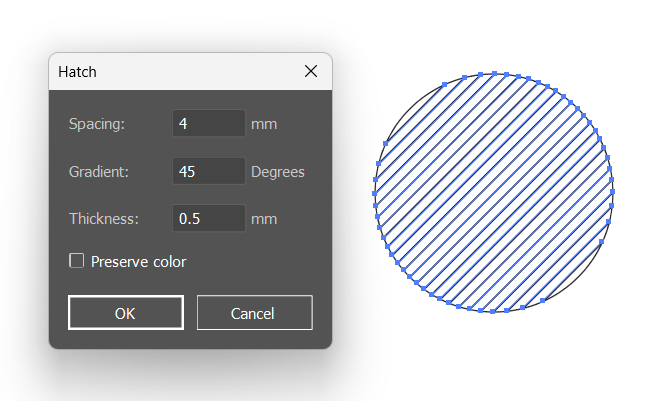
This Adobe Illustrator script, created by Christian Condamine, allows you to add vector hatches to the selected object (path or compound path). It includes a preview function to view live changes related to the settings. The values entered in the dialog box are saved in a .json file to be reloaded on the next launch of the script.
Usage
- Open Adobe Illustrator.
- Select a path or a compound path in the document.
- Run the script. A dialog box will appear.
- Fill in the following fields in the dialog box:
- Spacing: The distance between the hatches (in mm).
- Gradient: The angle of the hatches (in degrees).
- Thickness: The thickness of the hatches (in mm).
- Preserve color: Check this option to preserve the color of the selected object.
- Click the “OK” button to apply the hatches to the selected object.
- The script will create the hatches based on the input parameters and add them to the selected object.
Script Details
Localization
- The script supports both English and French languages. The language is automatically detected based on the user’s locale settings.
Dialog Box
- Spacing: Input field for the distance between the hatches (default: 4 mm).
- Gradient: Input field for the angle of the hatches (default: 45 degrees).
- Thickness: Input field for the thickness of the hatches (default: 0.5 mm).
- Preserve color: Checkbox to preserve the color of the selected object.
- OK Button: Button to apply the hatches.
- Cancel Button: Button to cancel the operation.
Parameter Saving
- The script saves the entered values in a
.jsonfile located in the user’s Documents folder (CC_Scripts/Hachures_param.json). These values are reloaded on the next launch of the script.
Functions
- startGUI: Initializes and displays the dialog box.
- majApercu: Updates the preview of the hatches.
- recueilDonnees: Collects the input data from the dialog box.
- action: Main function to create the hatches and apply them to the selected object.
- gBN: Retrieves a named item from the document.
- verifDossierParam: Verifies and creates the parameter folder if it doesn’t exist.
- sauverParametres: Saves the input data to the
.jsonfile. - chargerParametres: Loads the input data from the
.jsonfile. - valider: Finalizes the operation and resets the selection.
JavaScript
Hatches – Illustrator Script (0 downloads )
/*Hachures
>=----------------------------------------------------------------------------------------------------------------------------------------------------------------
Author: Christian Condamine - (christian.condamine@laposte.net)
>=----------------------------------------------------------------------------------------------------------------------------------------------------------------
En:     This script allows you to add vector hatches to the selected object (path or compoundpath). A preview function
            allows you to view live changes related to settings. The values entered in the dialog box are saved in a .json file to
            be reloaded on the next launch of the script.
>=----------------------------------------------------------------------------------------------------------------------------------------------------------------
Fr ;      Ce script permet d’ajouter des hachures vectorielles à l’objet sélectionné (tracé ou tracé transparent). Une fonction
            d’aperçu permet de visualiser en direct les changements liés aux réglages. Les valeurs entrées dans la boite de
            dialogue sont conservées dans un fichier .json pour être rechargées au lancement suivant du script.
*/
#targetengine 'main'

app.preferences.setBooleanPreference('ShowExternalJSXWarning', false); // Fix drag and drop a .jsx file
$.localize = true;
$.locale = null;
if ($.locale.substr(0, 2) != "fr") { $.locale = "en"; }

var nomScript = 'Hachures',
    fichierParam = {
        name: nomScript + '_param.json',
        folder: Folder.myDocuments + '/CC_Scripts/'
    };

var selection = app.activeDocument.selection;
if (selection.length < 1) {
    alert(localize({en:"You must select one path or one compound path.", fr:"La s\351lection doit \352tre compos\351e d'un trac\351ou d'un trac\351 transparent"}));
    throw new Error("No selection found.");
}
var monCalque = selection[0].layer;
var nbSel = selection.length;
var typeObj = 0;
var couleur;
var coulParDefaut;
var perim, x0, y0, L0, H0;
var defaire = false;

if (nbSel === 1) {
    coulParDefaut = new RGBColor();
    coulParDefaut.red = 0;
    coulParDefaut.green = 0;
    coulParDefaut.blue = 0;

    if (selection[0].typename === "PathItem") {
        typeObj = "P";
        if (selection[0].stroked === true) {
            couleur = selection[0].strokeColor;
            selection[0].filled = false;
        } else {
            couleur = selection[0].fillColor;
            selection[0].filled = false;
            selection[0].strokeColor = couleur;
        }
    }

    if (selection[0].typename === "CompoundPathItem") {
        typeObj = "C";
        if (selection[0].pathItems[0].stroked === true) {
            couleur = selection[0].pathItems[0].strokeColor;
        } else {
            couleur = selection[0].pathItems[0].fillColor;
        }
    }

    if (typeObj != 0) {
        selection[0].name = "baseSelection";
        perim = parseFloat((selection[0].width * 2 + selection[0].height).toFixed(0));
        x0 = selection[0].left;
        y0 = selection[0].top;
        L0 = selection[0].width;
        H0 = selection[0].height;

        //---------------------------------------------------------------------------------------------------------------------------------------------------------
        //     Dialog box
        //---------------------------------------------------------------------------------------------------------------------------------------------------------
        //==  Load parameters saved from the previous session
        var boiteDial = new Window('dialog', {en:"Hatch", fr:"Hachurer"});
        boiteDial.orientation = "column";
        boiteDial.alignChildren = ["fill", "center"];
        boiteDial.alignment = "left";

        //==  Espacement Group
        var grpEspacement = boiteDial.add('group');
        grpEspacement.orientation = "row";
        grpEspacement.spacing = 3;
        var lblEspacement = grpEspacement.add("statictext", undefined, {en:"Spacing:", fr:"Espacement :"});
        lblEspacement.size = [80, 18];
        var txtEspacement = grpEspacement.add("edittext", undefined, 4);
        txtEspacement.characters = 4;
        txtEspacement.size = [60, 23];
        var lblUnitEsp = grpEspacement.add("statictext", undefined, 'mm');
        lblUnitEsp.size = [25, 18];

        //==  Inclination Group
        var grpAngle = boiteDial.add('group');
        grpAngle.orientation = "row";
        grpAngle.spacing = 3;
        var lblAngle = grpAngle.add("statictext", undefined, {en:"Gradient:", fr:"Inclinaison :"});
        lblAngle.size = [80, 18];
        var txtAngle = grpAngle.add("edittext", undefined, 45);
        txtAngle.characters = 4;
        txtAngle.size = [60, 23];
        var lblUnitAngle = grpAngle.add("statictext", undefined, {en:"Degrees", fr:"degr\351s"});
        lblUnitAngle.size = [50, 18];

        //==  Stroke Thickness Group
        var grpEpTrait = boiteDial.add('group');
        grpEpTrait.orientation = "row";
        grpEpTrait.spacing = 3;
        var lblEpTrait = grpEpTrait.add("statictext", undefined, {en:"Thickness:", fr:"\311paisseur :"});
        lblEpTrait.size = [80, 18];
        var txtEpTrait = grpEpTrait.add("edittext", undefined, 0.5);
        txtEpTrait.characters = 4;
        txtEpTrait.size = [60, 23];
        var lblUnitEpTrait = grpEpTrait.add("statictext", undefined, 'mm');
        lblUnitEpTrait.size = [35, 18];

        //==  Option to use the color of the selected object
        var ckbConserCoul = boiteDial.add("checkbox", undefined, {en:"Preserve color", fr:"Conserver couleur"});
        ckbConserCoul.alignment = "left";

        var grpBoutons = boiteDial.add('group');
        grpBoutons.orientation = "row";
        grpBoutons.alignChildren = ["fill", "center"];
        var btnOk = grpBoutons.add('button', undefined, 'OK', {name: 'ok'});
        var btnAnnuler = grpBoutons.add('button', undefined, {en:"Cancel", fr:"Annuler"}, {name: 'cancel'});

        txtEspacement.onChange = function() { majApercu(); };
        txtAngle.onChange = function() { majApercu(); };
        txtEpTrait.onChange = function() { majApercu(); };
        ckbConserCoul.onClick = function() { majApercu(); };
        btnOk.onClick = function () { valider(); boiteDial.close(); };
        btnAnnuler.onClick = function() {
            if (defaire) {
                app.activeDocument.selection[0].remove();
                gBN(typeObj, "baseSelection").selected = true;
                defaire = false;
            }
            boiteDial.close();
        };
        boiteDial.onClose = function() { sauverParametres(); };
        verifDossierParam();
        chargerParametres();
        boiteDial.center();
        majApercu();
        boiteDial.show();
    } else {
        alert(localize({en:"You must select one path or one compound path.", fr:"La s\351lection doit \352tre compos\351e d'un trac\351ou d'un trac\351 transparent"}));
    }
} else {
    alert(localize({en:"You must select one path or one compound path.", fr:"La s\351lection doit \352tre compos\351e d'un trac\351ou d'un trac\351 transparent"}));
}

//---------------------------------------------------------------------------------------------------------------------------------------------------------
// Functions
//---------------------------------------------------------------------------------------------------------------------------------------------------------
function majApercu() {
    if (defaire) {
        app.activeDocument.selection[0].remove();
        app.activeDocument.selection = null;
        gBN(typeObj, "baseSelection").selected = true;
    } else {
        defaire = true;
        app.redraw();
    }
    action();
    app.redraw();
}

function recueilDonnees() {
    // Convert mm to points: 1mm = 2.834645 points
    espacement = parseFloat(txtEspacement.text * 2.834645);
    epTrait = parseFloat(txtEpTrait.text * 2.834645);
    angle = parseFloat(txtAngle.text);
    ConserCoul = ckbConserCoul.value;
}

function action() {
    recueilDonnees();
    app.copy();
    app.executeMenuCommand('pasteFront');
    app.activeDocument.selection[0].name = "copieBaseSelection";

    if (app.activeDocument.selection[0].typename == "PathItem") {
        app.activeDocument.selection[0].filled = true;
        app.activeDocument.selection[0].stroked = false;
    } else {
        for (var n = 0; n < app.activeDocument.selection[0].pathItems.length; n++) {
            app.activeDocument.selection[0].pathItems[n].filled = true;
            app.activeDocument.selection[0].pathItems[n].stroked = false;
        }
    }
    var grpHachures = monCalque.groupItems.add();
    grpHachures.name = "grpHachures";
    var lignes = [];
    for (var i = 0; i < (perim) / espacement; i++) {
        var ligne = grpHachures.pathItems.add();
        ligne.name = "ligne" + i;
        ligne.setEntirePath([[x0, y0 - (espacement * i)], [x0 + perim, y0 - (espacement * i)]]);
        ligne.stroked = true;
        ligne.strokeWidth = epTrait;
        if (ConserCoul) {
            ligne.strokeColor = couleur;
        } else {
            ligne.strokeColor = coulParDefaut;
        }
        lignes.push(ligne);
    }
    grpHachures.rotate(angle, true, false, false, false, Transformation.CENTER);
    grpHachures.left = x0 - (grpHachures.width - L0) / 2;
    grpHachures.top = y0 + (grpHachures.height - H0) / 2;
    var limGH_0 = grpHachures.geometricBounds[0] - 10;
    var limGH_1 = grpHachures.geometricBounds[1] + 10;
    var limGH_2 = grpHachures.geometricBounds[2] + 10;
    var limGH_3 = grpHachures.geometricBounds[3] - 10;
    var masque = monCalque.pathItems.add();
    masque.name = "masque";
    masque.setEntirePath([[limGH_0, limGH_1], [limGH_0, limGH_3], [limGH_2, limGH_3], [limGH_2, limGH_1]]);
    masque.closed = true;
    monCalque.selection = null;
    var groupeTemp = monCalque.groupItems.add();
    gBN(typeObj, "copieBaseSelection").move(groupeTemp, ElementPlacement.PLACEATBEGINNING);
    gBN("P", "masque").move(groupeTemp, ElementPlacement.PLACEATBEGINNING);
    groupeTemp.selected = true;
    app.executeMenuCommand('compoundPath');
    gBN("G", "grpHachures").selected = true;
    app.executeMenuCommand('ungroup');
    if (typeObj == "P") {
        app.executeMenuCommand('ungroup');
    }
    app.executeMenuCommand('Make Planet X');
    app.executeMenuCommand('Expand Planet X');
    app.executeMenuCommand('ungroup');
    var j, k = 0;
    for (j = 0; j < 2; j++) {
        if (app.activeDocument.selection[j].pageItems[0].typename == "CompoundPathItem") {
            k = j;
        }
        if (app.activeDocument.selection[j].pageItems[0].filled == true) {
            k = j;
        }
    }
    app.activeDocument.selection[k].remove();
}

function gBN(typeObj, objet) {
    var monItem;
    if (typeObj === "C") {
        monItem = monCalque.compoundPathItems.getByName(objet);
    } else if (typeObj === "G") {
        monItem = monCalque.groupItems.getByName(objet);
    } else {
        monItem = monCalque.pathItems.getByName(objet);
    }
    return monItem;
}

function verifDossierParam() {
    var monDossier = new Folder(fichierParam.folder);
    if (!monDossier.exists) {
        monDossier.create();
    }
}

function sauverParametres() {
    try {
        var paramHach = new File(fichierParam.folder + fichierParam.name);
        var donnees = [txtEspacement.text, txtAngle.text, txtEpTrait.text, ckbConserCoul.value].toString();
        paramHach.open('w');
        paramHach.write(donnees);
        paramHach.close();
    } catch (e) {
        $.errorMessage(e);
    }
}

function chargerParametres() {
    var paramHach = new File(fichierParam.folder + fichierParam.name);
    if (paramHach.exists) {
        try {
            paramHach.open('r');
            var donnees = paramHach.read().split('\n'),
                mesValeurs = donnees[0].split(',');
            txtEspacement.text = parseFloat(mesValeurs[0]);
            txtAngle.text = parseFloat(mesValeurs[1]);
            txtEpTrait.text = parseFloat(mesValeurs[2]);
            ckbConserCoul.value = (mesValeurs[3] === 'true');
        } catch (e) {}
        paramHach.close();
    }
}

function valider() {
    app.activeDocument.selection = null;
    gBN(typeObj, "baseSelection").selected = true;
    app.activeDocument.selection[0].name = "";
    perim = "";
    x0 = "";
    y0 = "";
    L0 = "";
    H0 = "";
}HATCH GENERATOR 2026 (New Version)
JavaScript
/*
============================================================================
 SCRIPT: Hatch Generator 2026 (Optimized)
 DESCRIPTION: Creates vector hatches with preview and curvature options.
 COMPATIBILITY: Adobe Illustrator CS6 - 2026
============================================================================
*/

#targetengine 'Hatch_Optimizer_Engine'

(function() {
    // --- CONTEXT CHECK ---
    if (app.documents.length === 0) {
        alert("Please open a document and select an object.");
        return;
    }

    var doc = app.activeDocument;
    var sel = doc.selection;

    // Validate Selection
    if (sel.length !== 1 || (sel[0].typename !== "PathItem" && sel[0].typename !== "CompoundPathItem")) {
        alert("Please select exactly one Path or Compound Path object.");
        return;
    }

    // --- CONFIGURATION ---
    var SCRIPT_NAME = "Hatch Generator 2026";
    var PREF_FILE = File(Folder.myDocuments + '/Hatch_2026_Settings.json');
    var MM_TO_PT = 2.834645; // Illustrator uses points internally

    // Default Settings
    var config = {
        spacing: 4,      // mm
        angle: 45,       // degrees
        thickness: 0.5,  // mm
        typeIndex: 0,    // 0 = Straight, 1-9 = Curves
        keepColor: false,
        expand: false    // false = Clipping Mask, true = Pathfinder Crop
    };

    // Load saved settings if they exist
    if (PREF_FILE.exists) {
        try {
            PREF_FILE.open('r');
            var loaded = eval('(' + PREF_FILE.read() + ')');
            for (var key in loaded) config[key] = loaded[key];
            PREF_FILE.close();
        } catch(e) {}
    }

    // --- UI VARIABLES ---
    var previewGroup = null;
    var isPreviewActive = false;
    var originalObject = sel[0];
    var originalLayer = originalObject.layer;

    // Save original object state (color/stroke) in case we need to restore or reference it
    var sourceProps = {
        fill: originalObject.filled ? originalObject.fillColor : new NoColor(),
        stroke: originalObject.stroked ? originalObject.strokeColor : new NoColor(),
        strokeWidth: originalObject.stroked ? originalObject.strokeWidth : 1
    };

    // --- BUILD INTERFACE ---
    var win = new Window('dialog', SCRIPT_NAME);
    win.orientation = 'column';
    win.alignChildren = ['fill', 'top'];
    win.spacing = 10;
    win.margins = 16;

    // 1. INPUT PANEL
    var pnlInput = win.add('panel', undefined, "Settings");
    pnlInput.orientation = 'column';
    pnlInput.alignChildren = ['left', 'center'];
    pnlInput.margins = 15;

    // Spacing
    var grpSpace = pnlInput.add('group');
    grpSpace.add('statictext', [0,0,90,20], "Spacing (mm):");
    var inpSpacing = grpSpace.add('edittext', [0,0,60,20], config.spacing);

    // Angle
    var grpAngle = pnlInput.add('group');
    grpAngle.add('statictext', [0,0,90,20], "Angle (deg):");
    var inpAngle = grpAngle.add('edittext', [0,0,60,20], config.angle);

    // Thickness
    var grpThick = pnlInput.add('group');
    grpThick.add('statictext', [0,0,90,20], "Thickness (mm):");
    var inpThick = grpThick.add('edittext', [0,0,60,20], config.thickness);

    // Pattern Type (Replaces Icons)
    var grpType = pnlInput.add('group');
    grpType.add('statictext', [0,0,90,20], "Pattern Style:");
    var listType = grpType.add('dropdownlist', [0,0,150,20], [
        "Type A (Straight)",
        "Type B (Curve Top-Right)",
        "Type C (Curve Top)",
        "Type D (S-Curve Vertical)",
        "Type E (S-Curve Horizontal)",
        "Type F (Loop)",
        "Type G (Wave 1)",
        "Type H (Wave 2)",
        "Type I (Corner)",
        "Type J (Archive)"
    ]);
    listType.selection = config.typeIndex;

    // 2. OPTIONS PANEL
    var pnlOpts = win.add('panel', undefined, "Options");
    pnlOpts.orientation = 'column';
    pnlOpts.alignChildren = ['left', 'center'];
    pnlOpts.margins = 15;

    var chkColor = pnlOpts.add('checkbox', undefined, "Preserve Original Color");
    chkColor.value = config.keepColor;

    var chkExpand = pnlOpts.add('checkbox', undefined, "Expand Appearance (Destructive)");
    chkExpand.value = config.expand;
    chkExpand.helpTip = "If checked, creates separate vector paths (Slower). If unchecked, uses a Clipping Mask (Editable).";

    // 3. PROGRESS BAR
    var progBar = win.add('progressbar', [0,0,280,10], 0, 100);
    progBar.visible = false;

    // 4. ACTION BUTTONS
    var grpBtns = win.add('group');
    grpBtns.orientation = 'row';
    grpBtns.alignment = 'center';

    var chkPreview = grpBtns.add('checkbox', undefined, "Preview");
    var btnCancel = grpBtns.add('button', undefined, "Cancel", {name: 'cancel'});
    var btnOK = grpBtns.add('button', undefined, "OK", {name: 'ok'});

    // --- EVENT LISTENERS ---

    // Update settings on change
    var inputs = [inpSpacing, inpAngle, inpThick, chkColor];
    for (var i=0; i<inputs.length; i++) {
        inputs[i].onChange = runPreview;
    }
    listType.onChange = runPreview;

    chkExpand.onClick = function() {
        if (chkPreview.value && this.value) {
            // Warn user that Expand + Preview is slow
            // alert("Note: Expanding is slow. The preview will remain non-destructive until you click OK.");
        }
    };

    chkPreview.onClick = function() {
        isPreviewActive = this.value;
        if (isPreviewActive) {
            runPreview();
        } else {
            clearPreview();
            app.redraw();
        }
    };

    btnCancel.onClick = function() {
        clearPreview();
        win.close();
    };

    btnOK.onClick = function() {
        // Final Execution
        clearPreview();
        saveConfig();

        progBar.visible = true;
        win.layout.layout(true); // Refresh UI to show progress bar

        try {
            generateHatch(false, progBar);
        } catch(e) {
            alert("Error processing hatch: " + e.message + "\nLine: " + e.line);
        }
        win.close();
    };

    // --- FUNCTIONS ---

    function saveConfig() {
        var data = {
            spacing: parseFloat(inpSpacing.text) || 4,
            angle: parseFloat(inpAngle.text) || 45,
            thickness: parseFloat(inpThick.text) || 0.5,
            typeIndex: listType.selection.index,
            keepColor: chkColor.value,
            expand: chkExpand.value
        };

        var f = new File(PREF_FILE);
        f.open('w');
        f.write(data.toSource()); // Simple serialization
        f.close();
    }

    function runPreview() {
        if (!chkPreview.value) return;

        // Validate inputs to prevent freeze
        if (parseFloat(inpSpacing.text) <= 0.05) return;

        clearPreview();
        try {
            previewGroup = generateHatch(true, null);
            app.redraw();
        } catch(e) {
            // Fail silently during preview
        }
    }

    function clearPreview() {
        if (previewGroup) {
            try { previewGroup.remove(); } catch(e) {}
            previewGroup = null;
        }
    }

    // MAIN GENERATION LOGIC
    function generateHatch(isPreview, pBar) {
        // 1. Gather numerical values
        var sp = parseFloat(inpSpacing.text) * MM_TO_PT;
        var ang = parseFloat(inpAngle.text);
        var th = parseFloat(inpThick.text) * MM_TO_PT;
        var type = listType.selection.index; // 0 to 9
        var doExpand = chkExpand.value;

        if (isNaN(sp) || sp < 0.1) sp = 10;

        // 2. Geometry Calculation
        var gb = originalObject.geometricBounds; // [L, T, R, B]
        var width = gb[2] - gb[0];
        var height = gb[1] - gb[3];
        var centerX = gb[0] + width/2;
        var centerY = gb[1] - height/2;

        // Calculate diagonal to cover the shape regardless of rotation
        var diag = Math.sqrt(Math.pow(width, 2) + Math.pow(height, 2));
        var radius = diag * 0.75; // slightly larger than half diagonal

        var startY = -radius;
        var count = Math.ceil((radius * 2) / sp);

        // 3. Create Container Group
        var container = originalLayer.groupItems.add();
        container.name = isPreview ? "Hatch_Preview" : "Hatch_Final";

        // 4. Set Color
        var lineStroke = new RGBColor();
        lineStroke.red = 0; lineStroke.green = 0; lineStroke.blue = 0;

        if (chkColor.value) {
            if (sourceProps.stroke.typename !== "NoColor") lineStroke = sourceProps.stroke;
            else if (sourceProps.fill.typename !== "NoColor") lineStroke = sourceProps.fill;
        }

        // 5. Curve Math Factors
        // Derived from original script logic: factor based on perimeter/1.8 roughly
        var perimeter = (width + height) * 2;
        var f = perimeter / 1.8;

        var h1x=0, h1y=0, h2x=0, h2y=0;

        switch(type) {
            case 0: break; // Straight
            case 1: h2x = -f; h2y = f; break;
            case 2: h2y = f; break;
            case 3: h1x = f; h1y = -f; h2x = f; h2y = f; break;
            case 4: h1x = f; h1y = -f; h2x = -f; h2y = f; break;
            case 5: h1x = f; h1y = f; h2x = -f; h2y = -f; break;
            case 6: h1x = f; h2x = -f; h2y = f; break;
            case 7: h1x = f; h2x = -f; h2y = -f; break;
            case 8: h1x = f; h1y = f; h2x = -f; break;
            case 9: h1x = f; h1y = -f; h2x = -f; break;
        }

        // 6. Loop & Draw
        if (pBar) { pBar.value = 0; pBar.maxvalue = count; }

        for (var i=0; i < count; i++) {
            var yPos = startY + (i * sp);

            var line = container.pathItems.add();
            var pt1 = line.pathPoints.add();
            var pt2 = line.pathPoints.add();

            // Anchor Points
            pt1.anchor = [-radius, yPos];
            pt2.anchor = [radius, yPos];

            // Handles (Curvature)
            pt1.rightDirection = [-radius + h1x, yPos + h1y];
            pt1.leftDirection = pt1.anchor;

            pt2.leftDirection = [radius + h2x, yPos + h2y];
            pt2.rightDirection = pt2.anchor;

            // Style
            line.stroked = true;
            line.filled = false;
            line.strokeWidth = th;
            line.strokeColor = lineStroke;

            if (pBar && i % 20 === 0) {
                pBar.value = i;
                win.update();
            }
        }

        // 7. Position & Rotate lines
        container.rotate(ang);
        // Center the hatch over the object
        container.position = [
            centerX - (container.width/2),
            centerY + (container.height/2)
        ];

        // 8. Masking or Expanding

        // We need a mask shape. Duplicate original.
        // Place temp group just above original
        container.move(originalObject, ElementPlacement.PLACEBEFORE);

        var mask = originalObject.duplicate(container, ElementPlacement.PLACEATBEGINNING);
        mask.filled = false;
        mask.stroked = false;

        // Mode A: Preview or Non-Destructive (Clipping Mask)
        if (isPreview || !doExpand) {
            container.clipped = true;
            return container;
        }

        // Mode B: Destructive (Expand / Crop)
        else {
            if (pBar) pBar.value = count; // Full bar

            // For Pathfinder Crop to work via script:
            // 1. Select the group (Mask + Lines)
            // 2. Execute 'Pathfinder Crop'

            // Deselect everything first
            doc.selection = null;
            container.selected = true;

            // Pathfinder Crop requires the TOP object to be the mask.
            // In the group `container`, `mask` is at PLACEATBEGINNING, which is index 0.
            // In Illustrator scripting, index 0 is usually the top-most in stack order for Groups.

            app.executeMenuCommand('Live Pathfinder Crop');
            app.executeMenuCommand('expandStyle');
            app.executeMenuCommand('ungroup');

            // cleanup selection result
            return doc.selection[0];
        }
    }

    // --- RUN ---
    win.center();
    win.show();

})();