Overview
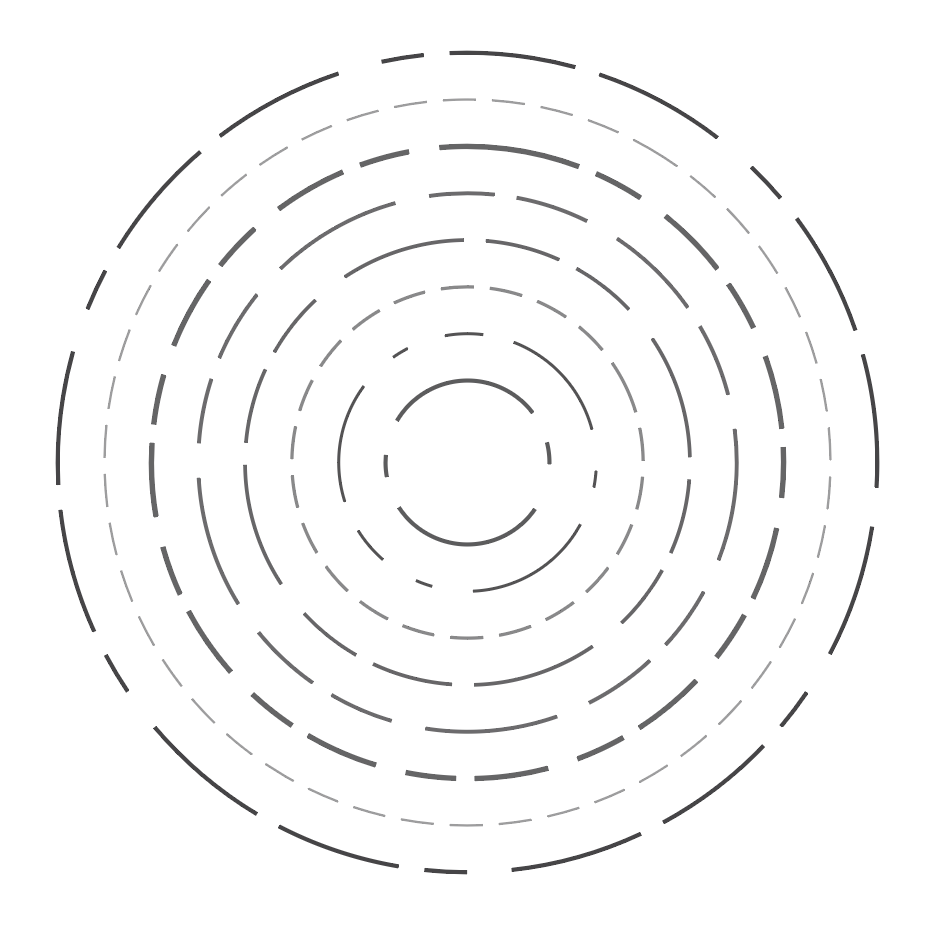
The HUD Ring Generator is an advanced Illustrator script designed to generate dynamic and customizable rings that can be used in various design projects, including user interfaces (UI), infographics, or artistic compositions. This script provides a graphical user interface (GUI) for easy customization of ring count, radius, thickness, gaps, and styles.
Features
- Ring Count: Specify the number of rings you want to generate.
- Radius Range: Define both minimum and maximum radii for the rings.
- Thickness: Customize the thickness of each ring and choose whether to vary it randomly.
- Gap Size: Set the size of gaps between rings.
- Complex Patterns: Enable complex patterns with random dash lengths and gap sizes.
- Live Preview: Instantly see your design changes before finalizing.
Installation
- Open Adobe Illustrator.
- File > Scripts > Other Script….
- Navigate to the location of the
Tech_Ring.jsxfile (or wherever you save the script). - Select the file and click Run.
Usage Guide
1. Opening a Document
- Ensure an Adobe Illustrator document is open before running the script. If no document is open, the script will prompt you to open one.
2. Accessing the Script Interface
- Run the script via
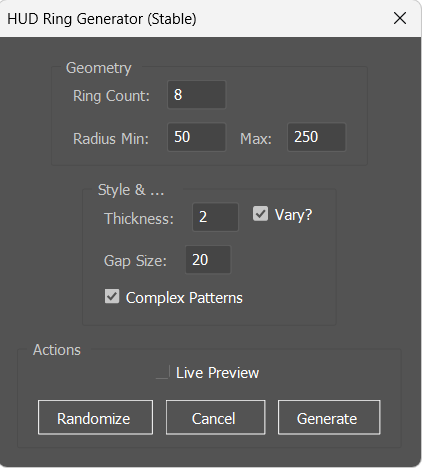
File > Scripts > Other Script...or by dragging the.jsxfile into the Illustrator window. - The HUD Ring Generator (Stable) dialog box will appear.
3. Customizing Settings
Geometry Panel
- Ring Count: Enter the number of rings you want to generate. The default is set to 8.
- Radius Min/Max: Define the minimum and maximum radii for the rings. The default range is from 50 to 250.
Style & Gaps Panel
- Thickness: Set the base thickness of the ring strokes. Default is 2 points.
- Vary Thickness: Enable this checkbox to randomly vary the thickness of each ring.
- Gap Size: Define the size of the gaps between rings. Default is 20 points.
- Complex Patterns: Enable complex patterns with random dash lengths and gap sizes.
Actions Panel
- Live Preview: Check this option to see real-time changes in your design.
- Randomize: Randomize all settings for quick experimentation.
- Cancel: Close the dialog box without generating any rings.
- Generate: Finalize the generation of rings based on the selected parameters and close the dialog.
Underlying Script Structure
The script is structured into several key sections:
1. Initialization
javascriptCopy blockvar SCRIPT_NAME = "HUD_Generator_v3_FIXED";
var PREVIEW_NAME = "HUD_PREVIEW_TEMP";

if (app.documents.length === 0) {
    alert("Please open a document first.");
    return;
}
2. User Interface (UI)
- Window: Creates a dialog box titled “HUD Ring Generator (Stable)”.
- Panels: Organizes settings into panels for better usability.
3. Utility Functions
- getNum(field, def): Safely retrieves and parses numeric values from input fields.
- cleanupPreview(): Removes any previous previews to prevent clutter in the document.
4. Core Functionality (runScript)
This function generates rings based on user-defined parameters:
javascriptCopy blockfunction runScript(isPreview) {
    var doc = app.activeDocument;
    // ... code for generating rings ...
}
5. Event Handling
- update(): Handles changes in the UI to update live previews.
- Button Clicks: Define actions for buttons like Randomize, Generate, and Cancel.
Conclusion
The HUD Ring Generator script offers a powerful tool for designers looking to create dynamic ring patterns quickly and efficiently within Adobe Illustrator. With its intuitive interface and numerous customization options, it is an invaluable addition to any designer’s workflow. Feel free to modify the script to suit your specific needs or experiment with different settings to achieve unique designs.
(function () {

    var SCRIPT_NAME = "HUD_Generator_v3_FIXED";
    var PREVIEW_NAME = "HUD_PREVIEW_TEMP";

    if (app.documents.length === 0) {
        alert("Please open a document first.");
        return;
    }

    // ================= UI =================

    var win = new Window("dialog", "HUD Ring Generator (Stable)");
    win.orientation = "row";
    win.alignChildren = ["fill", "fill"];

    var colControls = win.add("group");
    colControls.orientation = "column";

    // Geometry Panel
    var pnlGeo = colControls.add("panel", undefined, "Geometry");
    pnlGeo.alignChildren = ["left", "top"];

    var grpCount = pnlGeo.add("group");
    grpCount.add("statictext", undefined, "Ring Count:");
    var inpCount = grpCount.add("edittext", undefined, "8");
    inpCount.characters = 4;

    var grpRad = pnlGeo.add("group");
    grpRad.add("statictext", undefined, "Radius Min:");
    var inpMinRad = grpRad.add("edittext", undefined, "50");
    inpMinRad.characters = 4;
    grpRad.add("statictext", undefined, "Max:");
    var inpMaxRad = grpRad.add("edittext", undefined, "250");
    inpMaxRad.characters = 4;

    // Style Panel
    var pnlStyle = colControls.add("panel", undefined, "Style & Gaps");
    pnlStyle.alignChildren = ["left", "top"];

    var grpThick = pnlStyle.add("group");
    grpThick.add("statictext", undefined, "Thickness:");
    var inpThick = grpThick.add("edittext", undefined, "2");
    inpThick.characters = 3;
    var chkVarThick = grpThick.add("checkbox", undefined, "Vary?");
    chkVarThick.value = true;

    var grpGaps = pnlStyle.add("group");
    grpGaps.add("statictext", undefined, "Gap Size:");
    var inpGapSize = grpGaps.add("edittext", undefined, "20");
    inpGapSize.characters = 3;

    var chkComplex = pnlStyle.add("checkbox", undefined, "Complex Patterns");
    chkComplex.value = true;

    // Action Panel
    var pnlAct = colControls.add("panel", undefined, "Actions");
    var chkPreview = pnlAct.add("checkbox", undefined, "Live Preview");
    chkPreview.value = false;

    var grpBtns = pnlAct.add("group");
    var btnRand = grpBtns.add("button", undefined, "Randomize");
    var btnCancel = grpBtns.add("button", undefined, "Cancel");
    var btnOk = grpBtns.add("button", undefined, "Generate");

    // ================= UTIL =================

    function getNum(field, def) {
        var v = parseFloat(field.text);
        return isNaN(v) ? def : v;
    }

    function cleanupPreview() {
        try {
            var doc = app.activeDocument;
            for (var i = doc.pageItems.length - 1; i >= 0; i--) {
                if (doc.pageItems[i].name === PREVIEW_NAME) {
                    doc.pageItems[i].remove();
                }
            }
        } catch (e) {}
    }

    // ================= CORE =================

    function runScript(isPreview) {

        var doc = app.activeDocument;

        if (isPreview) cleanupPreview();

        var container = doc.groupItems.add();
        container.name = isPreview ? PREVIEW_NAME : "HUD_Rings_Final";

        var cx = doc.activeView.centerPoint[0];
        var cy = doc.activeView.centerPoint[1];

        var count = parseInt(inpCount.text, 10);
        if (isNaN(count) || count < 1) count = 5;

        if (count > 200 && isPreview) {
            alert("Too many rings for preview.");
            return;
        }

        var rMin = getNum(inpMinRad, 50);
        var rMax = getNum(inpMaxRad, 250);
        var thickBase = Math.max(getNum(inpThick, 2), 0.1);
        var gapBase = Math.max(getNum(inpGapSize, 20), 1);

        var isComplex = chkComplex.value;
        var isVarThick = chkVarThick.value;

        var rStep = (count > 1) ? (rMax - rMin) / (count - 1) : 0;

        for (var i = 0; i < count; i++) {

            var r = rMin + (i * rStep);
            var size = r * 2;

            var circ = container.pathItems.ellipse(
                cy + r,
                cx - r,
                size,
                size,
                false,
                true
            );

            circ.filled = false;
            circ.stroked = true;

            var col = new CMYKColor();
            col.black = 90;
            circ.strokeColor = col;

            if (isVarThick) {
                circ.strokeWidth = thickBase * (0.5 + Math.random());
            } else {
                circ.strokeWidth = thickBase;
            }

            // ===== DASH GENERATION (SAFE) =====

            var dashArray = [];

            if (isComplex) {

                var patternLength = 4 + Math.floor(Math.random() * 4);
                if (patternLength % 2 !== 0) patternLength++;

                for (var p = 0; p < patternLength; p++) {

                    var isGap = (p % 2 !== 0);

                    if (isGap) {
                        var gapVal = gapBase * (0.5 + Math.random());
                        if (gapVal < 5) gapVal = 5;
                        dashArray.push(gapVal);
                    } else {
                        var dashVal = 10 + Math.random() * 100;
                        dashArray.push(dashVal);
                    }
                }

            } else {

                var dashValSimple = 20 + Math.random() * 50;
                var gapValSimple = gapBase;

                dashArray.push(dashValSimple);
                dashArray.push(gapValSimple);
            }

            if (dashArray.length % 2 !== 0) {
                dashArray.push(5);
            }

            for (var k = 0; k < dashArray.length; k++) {
                if (!(dashArray[k] > 0)) {
                    dashArray[k] = 1;
                }
            }

            try {
                circ.strokeDashes = [];
                circ.strokeDashes = dashArray;
            } catch (err) {
                circ.strokeDashes = [20, 10];
            }

            circ.rotate(Math.random() * 360);
            circ.opacity = 50 + Math.random() * 50;
        }
    }

    // ================= EVENTS =================

    function update() {
        if (chkPreview.value) {
            runScript(true);
            app.redraw();
        }
    }

    btnRand.onClick = update;
    inpCount.onChange = update;
    inpMinRad.onChange = update;
    inpMaxRad.onChange = update;
    inpGapSize.onChange = update;
    chkComplex.onClick = update;
    chkVarThick.onClick = update;

    chkPreview.onClick = function () {
        if (this.value) update();
        else cleanupPreview();
    };

    btnOk.onClick = function () {
        cleanupPreview();
        runScript(false);
        win.close();
    };

    btnCancel.onClick = function () {
        cleanupPreview();
        win.close();
    };

    win.show();

})();