
Cinema 4D thrives on experimentation, and motion designers are constantly searching for ways to make particle systems feel alive, responsive, and interconnected. The Quantum Entanglement Effector is a Python‑driven tool that pushes particle animation into a new dimension—literally weaving invisible threads of connection, energy, and rhythm between clones.
Inspired by the physics concept of quantum entanglement, this effector creates particle systems that don’t just move independently—they react to each other, mirror behaviors, and pulse with shared energy. Add optional audio reactivity, and suddenly your designs can dance to music or soundscapes in real time.
✨ What Makes It Special
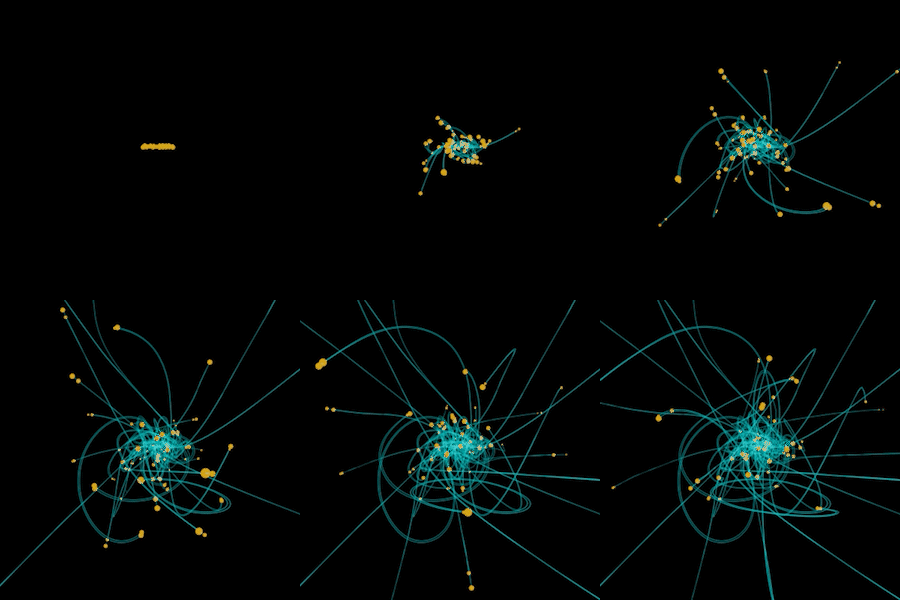
- Spontaneous Connections Particles form dynamic links with nearby neighbors, creating evolving networks that feel organic and alive.
- Mirrored Motion Connected particles influence each other’s velocity, producing synchronized or mirrored behaviors that suggest invisible forces at play.
- Energy Pulses Each particle oscillates with a pulse phase, scaling and shifting in rhythm. Together, they create mesmerizing waves of motion.
- Audio Reactivity Enable audio analysis to let particles respond to beats, bass, or ambient sound. Perfect for music videos, live visuals, or sound‑driven installations.
- Debug Visualization Toggle “Show Connections” to reveal the hidden web of entanglement lines—great for both artistic output and technical tuning.
🎨 Creative Applications for Motion Designers
- Music Visualizers Build particle systems that pulse and connect in sync with audio, creating immersive live visuals.
- Abstract Art Installations Generate evolving webs of particles that feel like living organisms, perfect for gallery projections or experimental films.
- Sci‑Fi Interfaces Use entanglement lines and pulsing particles to design futuristic HUDs, holograms, or data‑driven animations.
- Generative Branding Create logo reveals or brand animations where elements connect, pulse, and react together—symbolizing unity, energy, or innovation.
- Procedural Particle Networks Combine with MoGraph cloners to produce endlessly evolving particle swarms that feel both chaotic and harmonious.
⚙️ Artist‑Friendly Controls
The effector exposes intuitive User Data Parameters so designers can fine‑tune behaviors without touching code:
- Connection Range & Max Connections → Control how far particles reach and how many neighbors they entangle with.
- Entanglement Strength & Mirror Factor → Adjust how strongly particles influence each other’s motion.
- Pulse Speed & Decay → Shape the rhythm of energy transfers.
- Audio React & Reaction Scale → Make systems responsive to sound.
- Reset Simulation & Show Connections → Quickly restart or visualize the hidden network.
🌍 Why It Matters
Traditional particle systems often feel either too rigid or too chaotic. The Quantum Entanglement Effector introduces a middle ground: structured chaos. By weaving particles together with invisible rules, designers can create animations that feel organic, interconnected, and alive.
This tool embodies the essence of modern motion design: procedural systems that respond to both internal logic and external stimuli. It’s not just about moving particles—it’s about creating relationships between them.
🔮 Final Thoughts
The Quantum Entanglement Effector is more than a script—it’s a conceptual framework for motion design. It allows artists to explore themes of connection, energy, and rhythm in ways that feel both scientific and artistic. Whether you’re building a music visualizer, a sci‑fi interface, or an abstract art piece, this effector gives you the power to craft particle systems that pulse with life.
"""
Quantum Entanglement Effector

Creates interconnected particle systems that:
- Form spontaneous connections (entanglement)
- Mirror each other's movements
- Pulse with energy transfers
- React to audio analysis (optional)

User Data Parameters:
1. Connection Range (50-500, default: 200)
2. Entanglement Strength (0-5, default: 1.5)
3. Mirror Factor (0-1, default: 0.7)
4. Pulse Speed (0.1-5, default: 1.0)
5. Pulse Decay (0.1-1, default: 0.5)
6. Max Connections (1-20, default: 5)
7. Reset Simulation (Button)
8. Show Connections (Bool)
9. Audio React (Bool)
10. Reaction Scale (0-2, default: 1.0)
"""

import c4d
import math
import random
import time

# Global quantum system storage
quantum_system = {
    "positions": [],
    "velocities": [],
    "connections": [],
    "pulse_phases": [],
    "last_audio": 0,
    "initialized": False
}

def main() -> bool:
    global quantum_system

    # Get MoGraph data
    data = c4d.modules.mograph.GeGetMoData(op)
    if data is None:
        return True

    # Get current frame and count
    frame = doc.GetTime().GetFrame(doc.GetFps())
    matrices = data.GetArray(c4d.MODATA_MATRIX)
    count = data.GetCount()

    # Access user data
    connect_range = op[c4d.ID_USERDATA, 1] or 200.0
    strength = op[c4d.ID_USERDATA, 2] or 1.5
    mirror_factor = op[c4d.ID_USERDATA, 3] or 0.7
    pulse_speed = op[c4d.ID_USERDATA, 4] or 1.0
    pulse_decay = op[c4d.ID_USERDATA, 5] or 0.5
    max_conn = min(int(op[c4d.ID_USERDATA, 6] or 5), 20)
    show_conn = op[c4d.ID_USERDATA, 8] or False
    audio_react = op[c4d.ID_USERDATA, 9] or False
    react_scale = op[c4d.ID_USERDATA, 10] or 1.0

    # Handle reset button
    reset_simulation = False
    button_state = op.GetDataInstance().GetContainer(c4d.ID_USERDATA).GetData(c4d.ID_USERDATA + 7)
    if button_state and button_state.GetInt32(c4d.BITBUTTON_CLICKED):
        reset_simulation = True
        button_state.SetInt32(c4d.BITBUTTON_CLICKED, 0)
        op.SetDirty(c4d.DIRTYFLAGS_DATA)

    # Initialize system
    if not quantum_system["initialized"] or reset_simulation or len(quantum_system["positions"]) != count:
        quantum_system["positions"] = [m.off for m in matrices]
        quantum_system["velocities"] = [c4d.Vector(0,0,0) for _ in range(count)]
        quantum_system["connections"] = [[] for _ in range(count)]
        quantum_system["pulse_phases"] = [random.random()*math.pi*2 for _ in range(count)]
        quantum_system["last_audio"] = time.time()
        quantum_system["initialized"] = True

    try:
        # Audio reaction simulation (replace with real audio analysis if available)
        audio_impulse = 0.0
        if audio_react:
            if time.time() - quantum_system["last_audio"] > 0.1:  # Simulate audio pulses
                audio_impulse = (random.random() * react_scale) if random.random() > 0.7 else 0.0
                quantum_system["last_audio"] = time.time()

        # Update connections
        for i in range(count):
            pos_i = quantum_system["positions"][i]

            # Find nearest particles to connect to
            candidates = []
            for j in range(count):
                if i == j:
                    continue
                dist = (pos_i - quantum_system["positions"][j]).GetLength()
                if dist < connect_range:
                    candidates.append((j, dist))

            # Sort by distance and keep closest connections
            candidates.sort(key=lambda x: x[1])
            quantum_system["connections"][i] = [c[0] for c in candidates[:max_conn]]

            # Add random new connections occasionally
            if random.random() < 0.02 and len(candidates) > 0:
                new_conn = random.choice(candidates)[0]
                if new_conn not in quantum_system["connections"][i]:
                    quantum_system["connections"][i].append(new_conn)

        # Update physics
        for i in range(count):
            pos_i = quantum_system["positions"][i]
            vel_i = quantum_system["velocities"][i]
            accel = c4d.Vector(0,0,0)

            # Entanglement behavior with connected particles
            for j in quantum_system["connections"][i]:
                if j >= count:  # Skip if connection is invalid
                    continue

                pos_j = quantum_system["positions"][j]
                vel_j = quantum_system["velocities"][j]

                # Mirror movement
                mirror_effect = (vel_j - vel_i) * mirror_factor * 0.1
                accel += mirror_effect

                # Attraction/repulsion based on pulse phase difference
                phase_diff = math.sin(quantum_system["pulse_phases"][i] - quantum_system["pulse_phases"][j])
                direction = (pos_j - pos_i).GetNormalized() if (pos_j - pos_i).GetLength() > 0 else c4d.Vector(1,0,0)
                accel += direction * phase_diff * strength * 0.5

            # Audio reaction
            if audio_react and audio_impulse > 0 and random.random() < 0.3:
                accel += c4d.Vector(
                    random.random()*2-1,
                    random.random()*2-1,
                    random.random()*2-1
                ) * audio_impulse

            # Update physics
            vel_i += accel
            quantum_system["velocities"][i] = vel_i * 0.95  # Damping
            quantum_system["positions"][i] += vel_i * 0.1

            # Update pulse phases
            quantum_system["pulse_phases"][i] += pulse_speed * 0.1
            if quantum_system["pulse_phases"][i] > math.pi*2:
                quantum_system["pulse_phases"][i] -= math.pi*2

            # Apply to matrices with pulse scale
            pulse = math.sin(quantum_system["pulse_phases"][i]) * 0.5 + 1.0
            matrices[i].off = quantum_system["positions"][i]
            matrices[i].v1 = matrices[i].v1.GetNormalized() * pulse
            matrices[i].v2 = matrices[i].v2.GetNormalized() * pulse
            matrices[i].v3 = matrices[i].v3.GetNormalized() * pulse

            # Debug visualization
            if show_conn:
                for j in quantum_system["connections"][i]:
                    if j < count:  # Only draw valid connections
                        c4d.utils.DrawLine(
                            quantum_system["positions"][i],
                            quantum_system["positions"][j],
                            c4d.Vector(pulse, 0.5, 1-pulse),
                            c4d.DRAWLINE_FORCEFULL
                        )

    except Exception as e:
        print(f"Quantum Error: {str(e)}")
        quantum_system["initialized"] = False
        return True

    data.SetArray(c4d.MODATA_MATRIX, matrices, op[c4d.FIELDS].HasContent())
    return True


