Alpha Auto-Trim Batch Processor
Automatically Crop Transparent Video Edges with Python and FFmpeg
Modern motion-graphics workflows often involve rendering animations with transparency. Formats like ProRes 4444, WebM with alpha, or PNG sequences are commonly used to export elements such as titles, particles, logos, and effects from tools like After Effects, Blender, or Cinema 4D.
However, these renders frequently contain large areas of empty transparent space around the actual visual content. Manually trimming this space for every file can be tedious and time-consuming—especially when working with large batches.
The Alpha Auto-Trim Batch Processor is a Python desktop application designed to solve this problem automatically.
What This Tool Does
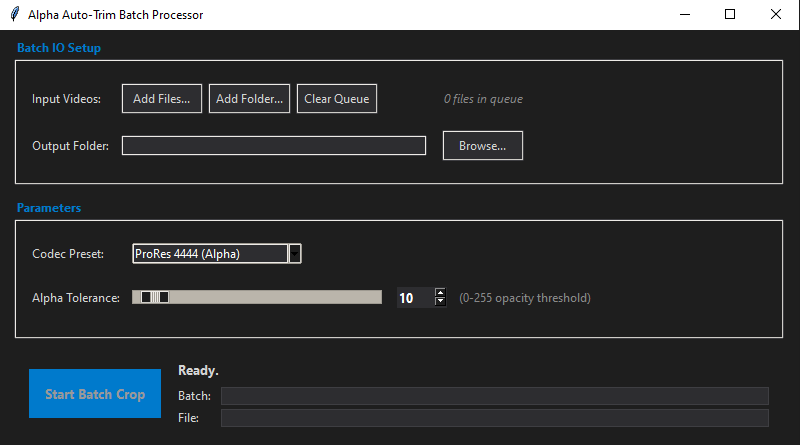
The script provides a graphical interface that allows users to batch analyze videos containing transparency and automatically crop them to the smallest bounding area containing visible pixels.
Instead of manually cropping each file in an editing or compositing program, the application:
- Detects the visible region in each frame.
- Calculates the maximum bounding box across the entire video.
- Crops the video to that region.
- Exports the result in a format that preserves transparency.
This process runs automatically for multiple files, saving significant time during production workflows.
Core Technologies Used
The script combines several powerful technologies:
Python (Main Application Logic)
Python acts as the orchestration layer that controls the user interface, file handling, threading, and process management.
Tkinter GUI
The interface is built with Tkinter, Python’s standard GUI toolkit.
It provides:
- File queue management
- Parameter controls
- Real-time progress monitoring
- Terminal-style logging
A modern dark theme is applied to improve usability and visual clarity.
FFmpeg (Video Processing Engine)
The heavy lifting is done by FFmpeg, a highly optimized multimedia processing library.
FFmpeg performs two key tasks:
Pass 1 — Analysis
format=rgba,alphaextract,bbox
This filter:
- Extracts the alpha channel
- Detects the bounding box of visible pixels
- Reports coordinates for every frame
Pass 2 — Cropping
After computing the global bounding area, FFmpeg re-encodes the video using:
crop=width:height:x:y
This ensures the final output only contains the visible content.
Automatic FFmpeg Installation
A particularly useful feature of the script is automatic dependency management.
If FFmpeg is not found on the system:
- The program downloads a prebuilt FFmpeg package.
- Extracts only the required executables.
- Stores them in a local
ffmpeg_binfolder. - Adds the folder to the application runtime PATH.
This removes the need for manual installation and makes the tool portable.
Supported Output Formats
The application supports several export options depending on workflow needs.
ProRes 4444 (Alpha)
High-quality production codec widely used in professional pipelines.
Settings used:
-c:v prores_ks
-profile:v 4444
-pix_fmt yuva444p10le
Ideal for:
- After Effects
- Premiere Pro
- Final Cut
- DaVinci Resolve
WebM VP9 (Alpha)
Web-friendly format that supports transparency.
Settings used:
-c:v libvpx-vp9
-pix_fmt yuva420p
Useful for:
- Web animation overlays
- UI elements
- Real-time graphics
PNG Image Sequences
Each frame is exported as an individual PNG file while preserving alpha.
-c:v png
This format is especially useful for:
- VFX pipelines
- Game engines
- compositing workflows
Batch Processing Workflow
The user workflow is simple:
1. Add Videos
Files can be added individually or by selecting a folder.
Supported formats:
- MOV
- MP4
- AVI
- WebM
2. Choose Output Folder
A directory is selected where processed files will be saved.
The script also verifies write permissions to avoid runtime failures.
3. Adjust Alpha Tolerance
A slider allows setting a transparency threshold (0–255).
This value controls how sensitive the bounding detection is:
- Low values detect faint pixels
- Higher values ignore subtle transparency
This helps avoid unwanted cropping caused by compression artifacts or anti-aliased edges.
4. Start Batch Processing
The application then processes each file sequentially:
- Analyze alpha bounds
- Compute global crop area
- Encode cropped video
- Save output
Two progress bars provide feedback:
- Batch Progress – overall progress across all files
- File Progress – current file status
A terminal output panel shows detailed logs.
Smart Frame Tracking
To provide accurate progress feedback, the script uses FFprobe to determine the exact frame count:
ffprobe -count_frames
This allows the progress bar to track both:
- analysis pass
- encoding pass
Each phase contributes 50% of the progress indicator.
Key Advantages
Major Time Savings
Manually cropping dozens or hundreds of rendered assets can take hours.
This script reduces that task to a single automated batch run.
Consistent Results
Because cropping is calculated from actual pixel data, the output remains consistent across the entire animation.
Fully Automated Pipeline
The program:
- downloads dependencies
- processes files
- tracks progress
- logs results
All without requiring command-line knowledge.
Ideal for Motion Graphics Workflows
The tool is particularly useful when working with:
- logo animations
- lower thirds
- particle effects
- animated UI components
- VFX elements
These assets often contain large transparent borders that waste resolution and storage.
Example Use Case
A motion designer exports 150 transparent ProRes clips containing logo animations.
Each render contains large margins around the animation.
Without automation:
- Every file must be imported
- Cropped manually
- Re-rendered
With the Alpha Auto-Trim Batch Processor:
- Add the folder containing the renders
- Select output location
- Start batch processing
The application analyzes and crops every file automatically.
Conclusion
The Alpha Auto-Trim Batch Processor demonstrates how Python can combine a simple graphical interface with powerful multimedia tools like FFmpeg to automate repetitive post-production tasks.
By detecting the actual visible region of transparent videos and trimming unnecessary margins, this tool streamlines workflows for motion designers, VFX artists, and video editors.
It eliminates manual cropping, ensures consistent results, and significantly speeds up batch processing of transparent video assets.
For artists dealing with large numbers of alpha-channel renders, this type of automation can quickly become an essential part of the production pipeline.
import tkinter as tk
from tkinter import ttk, filedialog, scrolledtext, messagebox
import subprocess
import threading
import re
import os
import urllib.request
import zipfile

class AutoCropApp:
    def __init__(self, root):
        self.root = root
        self.root.title("Alpha Auto-Trim Batch Processor")
        self.root.geometry("800x750")
        self.root.minsize(700, 600)

        # Apply Modern Dark Theme
        self.apply_dark_theme()

        # Core Variables
        self.input_files = [] # Stores the batch list
        self.output_dir = tk.StringVar()
        self.export_preset = tk.StringVar(value="ProRes 4444 (Alpha)")
        self.alpha_threshold = tk.IntVar(value=10)

        # Tracking Variables
        self.total_frames = 0
        self.is_processing = False

        # FFmpeg executable paths
        self.ffmpeg_cmd = 'ffmpeg'
        self.ffprobe_cmd = 'ffprobe'

        self.setup_ui()
        self.check_dependencies_thread()

    def apply_dark_theme(self):
        self.bg_dark = "#1e1e1e"
        self.bg_light = "#2d2d30"
        self.fg_main = "#d4d4d4"
        self.accent = "#007acc"
        self.border = "#3e3e42"

        self.root.configure(bg=self.bg_dark)

        style = ttk.Style()
        style.theme_use('clam')

        # Global Styles
        style.configure(".", background=self.bg_dark, foreground=self.fg_main, font=("Segoe UI", 9))
        style.configure("TLabel", background=self.bg_dark, foreground=self.fg_main)

        # Frames
        style.configure("TLabelframe", background=self.bg_dark, bordercolor=self.border, borderwidth=1)
        style.configure("TLabelframe.Label", background=self.bg_dark, foreground=self.accent, font=("Segoe UI", 9, "bold"))
        style.configure("TFrame", background=self.bg_dark)

        # Inputs & Buttons
        style.configure("TEntry", fieldbackground=self.bg_light, foreground=self.fg_main, borderwidth=1, bordercolor=self.border)

        # --- FIX FOR INVISIBLE COMBOBOX TEXT ---
        self.root.option_add('*TCombobox*Listbox.background', self.bg_light)
        self.root.option_add('*TCombobox*Listbox.foreground', '#ffffff')
        self.root.option_add('*TCombobox*Listbox.selectBackground', self.accent)
        self.root.option_add('*TCombobox*Listbox.selectForeground', '#ffffff')
        style.map('TCombobox',
                  fieldbackground=[('readonly', self.bg_light)],
                  selectbackground=[('readonly', self.accent)],
                  selectforeground=[('readonly', '#ffffff')],
                  foreground=[('readonly', '#ffffff')])

        style.configure("TButton", background=self.bg_light, foreground=self.fg_main, borderwidth=1, bordercolor=self.border, focuscolor=self.accent, padding=5)
        style.map("TButton", background=[("active", "#3e3e42")], bordercolor=[("active", self.accent)])

        style.configure("Accent.TButton", background=self.accent, foreground="#ffffff", borderwidth=0, font=("Segoe UI", 10, "bold"))
        style.map("Accent.TButton", background=[("active", "#0098ff")])

        # Progress Bar
        style.configure("Horizontal.TProgressbar", background=self.accent, troughcolor=self.bg_light, bordercolor=self.border, thickness=8)

    def setup_ui(self):
        # --- File Selection Frame ---
        file_frame = ttk.LabelFrame(self.root, text=" Batch IO Setup ", padding=(15, 15))
        file_frame.pack(fill=tk.X, padx=15, pady=10)

        # Batch Input Controls
        ttk.Label(file_frame, text="Input Videos:").grid(row=0, column=0, sticky=tk.W, pady=8, padx=(0,10))
        btn_frame = ttk.Frame(file_frame)
        btn_frame.grid(row=0, column=1, sticky=tk.W, pady=8)

        ttk.Button(btn_frame, text="Add Files...", command=self.add_files).pack(side=tk.LEFT, padx=(0, 5))
        ttk.Button(btn_frame, text="Add Folder...", command=self.add_folder).pack(side=tk.LEFT, padx=(0, 5))
        ttk.Button(btn_frame, text="Clear Queue", command=self.clear_queue).pack(side=tk.LEFT)

        self.queue_label = ttk.Label(file_frame, text="0 files in queue", font=("Segoe UI", 9, "italic"), foreground="#888888")
        self.queue_label.grid(row=0, column=2, sticky=tk.W, padx=15)

        # Output Directory
        ttk.Label(file_frame, text="Output Folder:").grid(row=1, column=0, sticky=tk.W, pady=8, padx=(0,10))
        ttk.Entry(file_frame, textvariable=self.output_dir, width=50).grid(row=1, column=1, pady=8, sticky=tk.W)
        ttk.Button(file_frame, text="Browse...", command=self.browse_output_dir).grid(row=1, column=2, padx=15, pady=8, sticky=tk.W)

        # --- Settings Frame ---
        settings_frame = ttk.LabelFrame(self.root, text=" Parameters ", padding=(15, 15))
        settings_frame.pack(fill=tk.X, padx=15, pady=5)

        ttk.Label(settings_frame, text="Codec Preset:").grid(row=0, column=0, sticky=tk.W, pady=8, padx=(0,10))
        presets = ["ProRes 4444 (Alpha)", "WebM VP9 (Alpha)", "PNG Sequence (Alpha)"]
        combo = ttk.Combobox(settings_frame, textvariable=self.export_preset, values=presets, state="readonly", width=25)
        combo.grid(row=0, column=1, sticky=tk.W, pady=8)

        # Tolerance Slider + Numeric Input
        ttk.Label(settings_frame, text="Alpha Tolerance:").grid(row=1, column=0, sticky=tk.W, pady=15, padx=(0,10))

        scale_frame = ttk.Frame(settings_frame)
        scale_frame.grid(row=1, column=1, sticky=tk.W, pady=15, columnspan=2)

        slider = ttk.Scale(scale_frame, from_=0, to=255, variable=self.alpha_threshold, orient=tk.HORIZONTAL, length=250)
        slider.pack(side=tk.LEFT, padx=(0, 15))

        spinbox = tk.Spinbox(
            scale_frame, from_=0, to=255, textvariable=self.alpha_threshold,
            width=5, bg=self.bg_light, fg="#ffffff", insertbackground="#ffffff",
            buttonbackground=self.bg_dark, relief="flat", font=("Segoe UI", 10, "bold")
        )
        spinbox.pack(side=tk.LEFT)

        ttk.Label(scale_frame, text="(0-255 opacity threshold)", foreground="#888888").pack(side=tk.LEFT, padx=(10, 0))

        # --- Progress & Execution Frame ---
        exec_frame = ttk.Frame(self.root, padding=(15, 10))
        exec_frame.pack(fill=tk.X, padx=15, pady=5)

        self.start_btn = ttk.Button(exec_frame, text="Start Batch Crop", command=self.start_batch, style="Accent.TButton", state=tk.DISABLED)
        self.start_btn.pack(side=tk.LEFT, padx=(0, 15), ipadx=10, ipady=10)

        status_frame = ttk.Frame(exec_frame)
        status_frame.pack(side=tk.LEFT, fill=tk.X, expand=True)

        self.status_var = tk.StringVar(value="Initializing...")
        ttk.Label(status_frame, textvariable=self.status_var, font=("Segoe UI", 10, "bold")).pack(anchor=tk.W)

        # Dual Progress Bars (Batch vs Current File)
        progress_container = ttk.Frame(status_frame)
        progress_container.pack(fill=tk.X, pady=(5, 0))

        ttk.Label(progress_container, text="Batch:", width=6).grid(row=0, column=0, sticky=tk.W)
        self.batch_progress = ttk.Progressbar(progress_container, orient=tk.HORIZONTAL, mode='determinate')
        self.batch_progress.grid(row=0, column=1, sticky="ew", padx=(5,0), pady=2)

        ttk.Label(progress_container, text="File:", width=6).grid(row=1, column=0, sticky=tk.W)
        self.file_progress = ttk.Progressbar(progress_container, orient=tk.HORIZONTAL, mode='determinate')
        self.file_progress.grid(row=1, column=1, sticky="ew", padx=(5,0), pady=2)

        progress_container.columnconfigure(1, weight=1)

        # --- Debug / Log Text Area ---
        log_frame = ttk.LabelFrame(self.root, text=" Terminal Output ", padding=(10, 10))
        log_frame.pack(fill=tk.BOTH, expand=True, padx=15, pady=10)

        self.log_area = scrolledtext.ScrolledText(
            log_frame, wrap=tk.WORD, state='disabled',
            font=("Consolas", 9), bg="#141414", fg="#cccccc",
            insertbackground="#cccccc", relief="flat"
        )
        self.log_area.pack(fill=tk.BOTH, expand=True)

    def log(self, message):
        self.log_area.config(state='normal')
        self.log_area.insert(tk.END, message + "\n")
        self.log_area.see(tk.END)
        self.log_area.config(state='disabled')
        self.root.update_idletasks()

    def update_queue_label(self):
        count = len(self.input_files)
        self.queue_label.config(text=f"{count} files in queue")
        if count > 0 and self.output_dir.get() and not self.is_processing:
            self.start_btn.config(state=tk.NORMAL)
        else:
            self.start_btn.config(state=tk.DISABLED)

    def add_files(self):
        filepaths = filedialog.askopenfilenames(title="Select Videos", filetypes=[("Video Files", "*.mov *.mp4 *.avi *.webm")])
        if filepaths:
            for fp in filepaths:
                if fp not in self.input_files:
                    self.input_files.append(fp)
            self.update_queue_label()
            self.log(f"Added {len(filepaths)} files to queue.")

    def add_folder(self):
        folder_path = filedialog.askdirectory(title="Select Input Folder")
        if folder_path:
            valid_exts = ('.mov', '.mp4', '.avi', '.webm')
            found = 0
            for file in os.listdir(folder_path):
                if file.lower().endswith(valid_exts):
                    full_path = os.path.join(folder_path, file)
                    if full_path not in self.input_files:
                        self.input_files.append(full_path)
                        found += 1
            self.update_queue_label()
            self.log(f"Scanned folder: Added {found} supported videos to queue.")

    def clear_queue(self):
        self.input_files.clear()
        self.update_queue_label()
        self.log("Queue cleared.")

    def browse_output_dir(self):
        folder_path = filedialog.askdirectory(title="Select Output Folder")
        if folder_path:
            self.output_dir.set(folder_path)
            self.update_queue_label()

    def check_dependencies_thread(self):
        threading.Thread(target=self._verify_or_install_ffmpeg, daemon=True).start()

    def _verify_or_install_ffmpeg(self):
        self.log("System Check: Verifying FFmpeg installation...")
        try:
            subprocess.run([self.ffmpeg_cmd, '-version'], stdout=subprocess.PIPE, stderr=subprocess.PIPE)
            self.log("-> FFmpeg found in global system PATH. Ready.")
            self._enable_ui()
            return
        except FileNotFoundError:
            self.log("-> FFmpeg not found in global PATH. Checking local directory...")

        local_bin_dir = os.path.join(os.getcwd(), "ffmpeg_bin")
        local_ffmpeg = os.path.join(local_bin_dir, "ffmpeg.exe")
        local_ffprobe = os.path.join(local_bin_dir, "ffprobe.exe")

        if os.path.exists(local_ffmpeg) and os.path.exists(local_ffprobe):
            self.log(f"-> Local FFmpeg found at: {local_bin_dir}")
            self.ffmpeg_cmd = local_ffmpeg
            self.ffprobe_cmd = local_ffprobe
            os.environ["PATH"] += os.pathsep + local_bin_dir
            self._enable_ui()
            return

        self.log("-> Local FFmpeg not found. Starting automatic download...")
        self.status_var.set("Downloading FFmpeg... Please wait.")
        self.batch_progress.config(mode='indeterminate')
        self.batch_progress.start(10)

        try:
            os.makedirs(local_bin_dir, exist_ok=True)
            zip_path = os.path.join(os.getcwd(), "ffmpeg_temp.zip")
            url = "https://www.gyan.dev/ffmpeg/builds/ffmpeg-release-essentials.zip"
            urllib.request.urlretrieve(url, zip_path)

            with zipfile.ZipFile(zip_path, 'r') as zip_ref:
                for file_info in zip_ref.infolist():
                    if file_info.filename.endswith('ffmpeg.exe'):
                        file_info.filename = 'ffmpeg.exe'
                        zip_ref.extract(file_info, local_bin_dir)
                    elif file_info.filename.endswith('ffprobe.exe'):
                        file_info.filename = 'ffprobe.exe'
                        zip_ref.extract(file_info, local_bin_dir)

            if os.path.exists(zip_path):
                os.remove(zip_path)

            self.ffmpeg_cmd = local_ffmpeg
            self.ffprobe_cmd = local_ffprobe
            os.environ["PATH"] += os.pathsep + local_bin_dir

            self.batch_progress.stop()
            self.batch_progress.config(mode='determinate')
            self._enable_ui()

        except Exception as e:
            self.batch_progress.stop()
            self.batch_progress.config(mode='determinate')
            self.log(f"CRITICAL ERROR during setup: {str(e)}")
            self.status_var.set("Setup failed.")

    def _enable_ui(self):
        self.status_var.set("Ready.")
        self.batch_progress['value'] = 0
        self.update_queue_label()

    def get_total_frames(self, input_file):
        cmd = [
            self.ffprobe_cmd, '-v', 'error', '-select_streams', 'v:0',
            '-count_frames', '-show_entries', 'stream=nb_read_frames',
            '-of', 'default=nokey=1:noprint_wrappers=1', input_file
        ]
        try:
            result = subprocess.run(cmd, stdout=subprocess.PIPE, stderr=subprocess.PIPE, text=True)
            return int(result.stdout.strip())
        except Exception as e:
            self.log(f"Warning: Could not determine exact total frames for {os.path.basename(input_file)}. ({e})")
            return 100

    def check_write_permissions(self, out_dir):
        try:
            test_file = os.path.join(out_dir, ".write_test.tmp")
            with open(test_file, 'w'):
                pass
            os.remove(test_file)
            return True
        except PermissionError:
            messagebox.showerror("Permission Denied", f"Cannot write to directory:\n{out_dir}\n\nPlease check your network drive permissions.")
            return False
        except Exception as e:
            self.log(f"ERROR validating output path: {str(e)}")
            return False

    def start_batch(self):
        if not self.input_files:
            messagebox.showerror("Error", "Queue is empty. Add some files first.")
            return

        out_dir = self.output_dir.get()
        if not os.path.isdir(out_dir):
            messagebox.showerror("Error", "Please select a valid Output Folder.")
            return

        if not self.check_write_permissions(out_dir):
            return

        self.is_processing = True
        self.start_btn.config(state=tk.DISABLED)
        self.batch_progress['value'] = 0
        self.file_progress['value'] = 0
        self.log_area.config(state='normal')
        self.log_area.delete(1.0, tk.END)
        self.log_area.config(state='disabled')

        # Start background batch thread
        threading.Thread(target=self.run_batch_pipeline, daemon=True).start()

    def run_batch_pipeline(self):
        out_dir = self.output_dir.get()
        preset = self.export_preset.get()
        tolerance = int(self.alpha_threshold.get())
        total_files = len(self.input_files)

        self.log(f"--- BATCH STARTED ({total_files} files) ---")

        for index, in_file in enumerate(self.input_files):
            # Update Overall Batch Progress
            self.batch_progress['value'] = (index / total_files) * 100

            filename = os.path.basename(in_file)
            base_name, _ = os.path.splitext(filename)
            self.log(f"\n[{index+1}/{total_files}] Processing: {filename}")

            # Determine Output Path based on Preset
            if "ProRes" in preset:
                out_file = os.path.join(out_dir, f"{base_name}_cropped.mov")
            elif "WebM" in preset:
                out_file = os.path.join(out_dir, f"{base_name}_cropped.webm")
            else: # PNG Sequence
                # Create a subfolder for the sequence to prevent a mess
                seq_dir = os.path.join(out_dir, f"{base_name}_seq")
                os.makedirs(seq_dir, exist_ok=True)
                out_file = os.path.join(seq_dir, f"{base_name}_%04d.png")

            success = self.process_single_file(in_file, out_file, preset, tolerance)

            if not success:
                self.log(f"-> Skipped/Failed: {filename}")

        # Batch Complete
        self.batch_progress['value'] = 100
        self.file_progress['value'] = 100
        self.status_var.set("Batch Complete!")
        self.log("\n--- ALL FILES PROCESSED ---")
        messagebox.showinfo("Success", f"Batch completed.\nProcessed {total_files} files.")

        self.reset_ui()

    def process_single_file(self, in_file, out_file, preset, tolerance):
        self.total_frames = self.get_total_frames(in_file)
        self.file_progress['value'] = 0

        # --- PASS 1: Analysis ---
        self.status_var.set(f"Analyzing: {os.path.basename(in_file)}")
        filter_string = f"format=rgba,alphaextract,bbox=min_val={tolerance}"
        cmd_analyze = [self.ffmpeg_cmd, '-i', in_file, '-vf', filter_string, '-f', 'null', '-']

        process_analyze = subprocess.Popen(cmd_analyze, stderr=subprocess.PIPE, text=True, universal_newlines=True)
        frame_pattern = re.compile(r'n:(\d+)')
        bbox_pattern = re.compile(r'x1:(\d+)\s+x2:(\d+)\s+y1:(\d+)\s+y2:(\d+)')

        min_x1, min_y1 = float('inf'), float('inf')
        max_x2, max_y2 = 0, 0
        found_alpha = False

        for line in process_analyze.stderr:
            frame_match = frame_pattern.search(line)
            if frame_match and self.total_frames > 0:
                current_frame = int(frame_match.group(1))
                # Pass 1 takes up the first 50% of the file progress bar
                self.file_progress['value'] = (current_frame / self.total_frames) * 50

            bbox_match = bbox_pattern.search(line)
            if bbox_match:
                found_alpha = True
                x1, x2, y1, y2 = map(int, bbox_match.groups())
                if x1 < min_x1: min_x1 = x1
                if y1 < min_y1: min_y1 = y1
                if x2 > max_x2: max_x2 = x2
                if y2 > max_y2: max_y2 = y2

        process_analyze.wait()

        if not found_alpha:
            self.log("ERROR: No transparency detected or falls below tolerance threshold.")
            return False

        crop_w = max_x2 - min_x1
        crop_h = max_y2 - min_y1

        # --- PASS 2: Cropping ---
        self.status_var.set(f"Cropping: {os.path.basename(in_file)}")
        base_cmd = [self.ffmpeg_cmd, '-i', in_file, '-vf', f'crop={crop_w}:{crop_h}:{min_x1}:{min_y1}']

        if "ProRes" in preset:
            encode_args = ['-c:v', 'prores_ks', '-profile:v', '4444', '-pix_fmt', 'yuva444p10le']
        elif "WebM" in preset:
            encode_args = ['-c:v', 'libvpx-vp9', '-pix_fmt', 'yuva420p', '-auto-alt-ref', '0']
        else:
            encode_args = ['-c:v', 'png']

        cmd_encode = base_cmd + encode_args + ['-y', out_file]
        process_encode = subprocess.Popen(cmd_encode, stderr=subprocess.PIPE, text=True, universal_newlines=True)
        encode_frame_pattern = re.compile(r'frame=\s*(\d+)')

        for line in process_encode.stderr:
            match = encode_frame_pattern.search(line)
            if match and self.total_frames > 0:
                current_frame = int(match.group(1))
                # Pass 2 takes the remaining 50% to 100%
                self.file_progress['value'] = 50 + ((current_frame / self.total_frames) * 50)

        process_encode.wait()

        if process_encode.returncode == 0:
            self.log(f"-> Saved: {os.path.basename(out_file)}")
            return True
        else:
            self.log("ERROR: FFmpeg returned a non-zero exit code during encoding.")
            return False

    def reset_ui(self):
        self.is_processing = False
        self.start_btn.config(state=tk.NORMAL)

if __name__ == "__main__":
    root = tk.Tk()
    app = AutoCropApp(root)
    root.mainloop()